Agents
Rows in the chat
In Claude Desktop and other clients that draw MCP Apps, the rows your agent gets show up right in the chat as a table you can sort, and a change it proposes shows up as a card that follows what you decide. One click opens either in Rowkery.
A query's rows
When the agent calls query, the chat shows Rowkery's view under the agent's message.
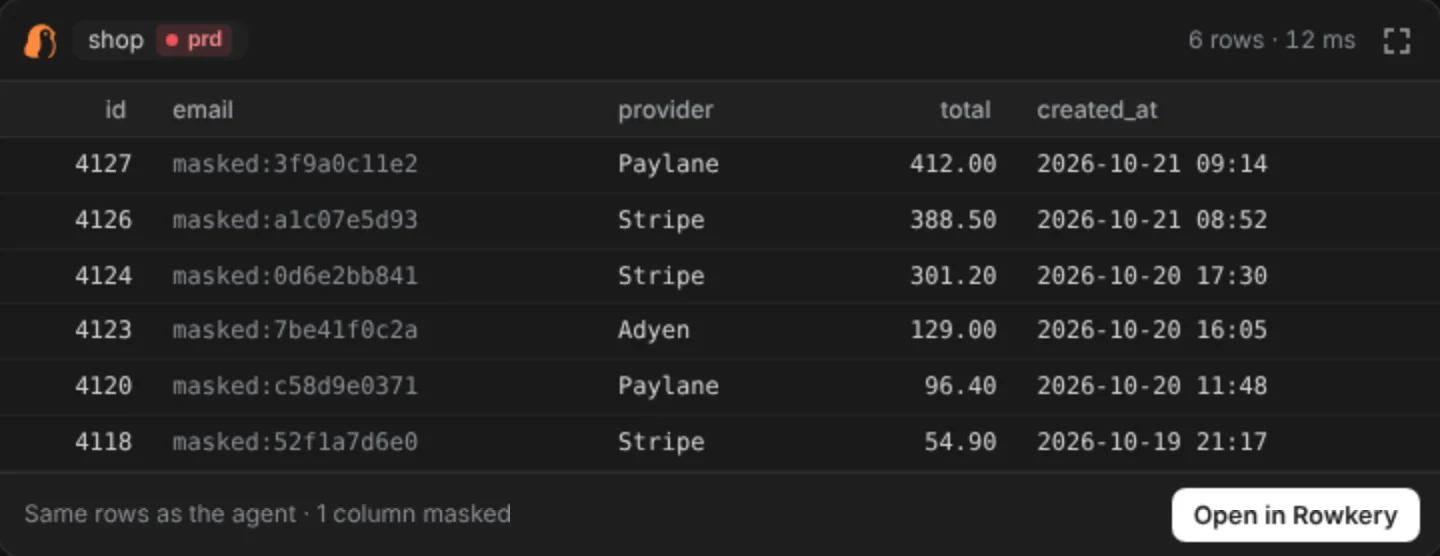
- The same rows the agent got, nothing more: the same checks, the same row limit, and the same stand-ins for sensitive columns, shown dimmed.
- The connection and its environment tag, so you can tell prd from local at a glance.
- Sort by clicking a column header, or focus it and press ↵ or Space. Click again to reverse. Numbers sort as numbers, and NULLs go last either way.
- When the agent hit its row limit, the head reads "First 200 rows" instead of "200 rows".
- Long and wide results scroll inside the table, down and sideways. Hover a cell to read a long value in full. The button at the top right shows the view full screen, where the client offers it.
- Open in Rowkery brings Rowkery to the front with the agent's query in a new tab on that connection, and runs it at once. It opens in the window already on that connection and database, or in a new one. Safe mode applies as it does to anything you run, and the query stays out of Recent queries.
A refused query shows Rowkery's reason instead of a table, the same text the agent gets.
A proposed change
When the agent calls propose_change, the chat shows a card with each statement's verb and table, the agent's reason, and the SQL. A change with one statement also shows how many rows the agent expects it to change.
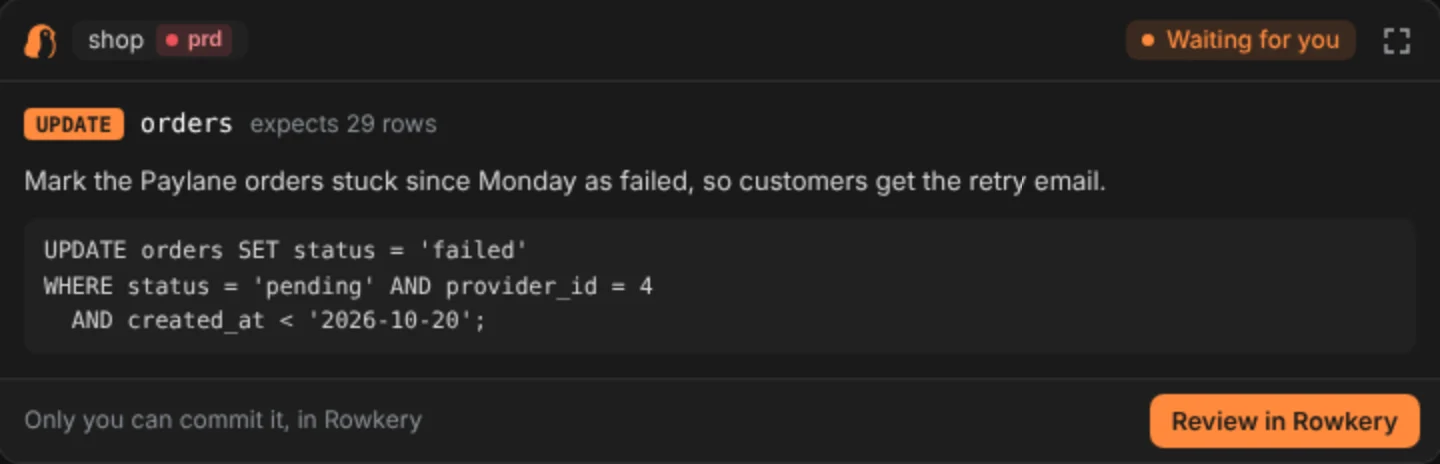
Review in Rowkery opens the Agents page on that change, ready for a dry run. The card can't commit anything: only you can, in Rowkery.
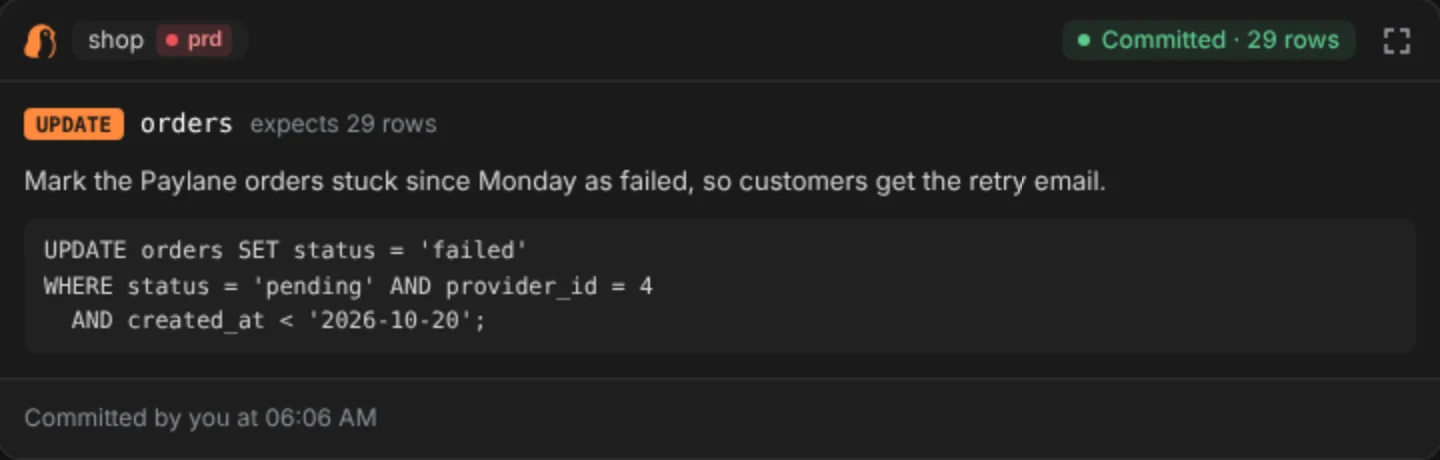
While the card is on screen, it checks back every few seconds and shows what you decided: Committed with the rows changed, Rejected with your note (or the time, if you left none), Commit failed, or Expired after 24 hours. The button goes once the change is decided.
Which clients show it
Rowkery's view shows in clients that support MCP Apps, such as Claude Desktop, VS Code and Goose. Other clients, like Claude Code in a terminal, get the same text as before. Where the table shows, Rowkery also asks the agent not to retype the rows as a table of its own.
Open in Rowkery and Review in Rowkery work on a Mac, with the installed Rowkery app. If the buttons don't show, the client can't call tools from a view, or Rowkery is running somewhere other than a Mac. A client that can't call tools also leaves a proposal's card at Waiting for you, since the card can't check back.
After a click, the button reads Opened for a moment. If Rowkery isn't installed, the foot of the view says "Couldn't open Rowkery. Is it installed?"
What a button can open
The buttons don't send links through the chat. They ask Rowkery's MCP server, on your Mac, to open Rowkery, so the client shows no "Open external link" prompt.
- A query button carries the call's id and a random key from the activity log. Rowkery reads the SQL from the log, and opens only a query that its checks let through. A web page can't make Rowkery run anything, because it can't guess a key.
- A review button carries the proposal's id. It only opens the review, where nothing commits until you press Commit.
- A call that's gone from the log (cleared, or old enough to be rotated out): Rowkery opens and shows a toast, "That query isn't in Rowkery's activity log any more". For a connection you've since deleted, the toast reads "That connection isn't in Rowkery any more".
- A change that's no longer waiting: the toast reads "That change isn't waiting for you any more", and no other change opens in its place.
- No network. The view is one page bundled with Rowkery. It loads nothing from the internet, and the client's sandbox wouldn't let it.
- Clicks in the view aren't written to the activity log. The query they open runs like any query you run yourself, apart from staying out of Recent queries.