Working with data
Editing rows
You can change values, add rows and delete rows right in a table tab's grid. Nothing is written as you go: your changes are staged, you can read the exact SQL, and Commit saves them all in one transaction.
When a table can be edited
You can edit rows in a table tab when all of these are true:
- The tab shows a table, not a view.
- The table has a primary key, and every key column is shown (not hidden).
- The connection's safe mode isn't Read-only.
- The tab shows Data, not Structure.
Query tabs show results without editing. To edit rows a query found, open the table in a table tab and filter it.
When you try to edit and can't, the foot of the grid says why for a few seconds:
| Message | What to do |
|---|---|
| Read-only connection · Change safe mode… | Change the connection's safe mode. See Environments and safe mode |
| Views can't be edited | Edit the table the view reads |
| No primary key · rows here can't be edited | Rows can only be named by a primary key |
| Show id to edit rows | Show the hidden key column again |
| This table isn't in the schema yet | Refresh the schema; the table was created after it was read |
| This row's key can't name it | The key's value can't be written as a literal |
Changing a value
Select a cell and press ↵ or F2, or double-click it. The cell becomes an editor with its current value. Typing on a selected cell without opening the editor doesn't change it (in a table tab, typing filters), so you can't overwrite a value by accident.
| Key | In the editor |
|---|---|
| ↵ | Stages the value and moves down a row |
| ⇥ / ⇧⇥ | Stages it and moves right or left |
| Esc | Leaves the cell as it was |
| ⌥⇧N | Stages NULL. Columns that can't be NULL say Can't be NULL |
| Click elsewhere | Keeps a changed, valid value |
If the value you leave is the same as the one you started with, nothing is staged.
To set a cell to NULL without opening it, select it and press ⌥⇧N, or right-click and choose Set NULL.
Editors for each type
The editor fits the column's type and refuses values the database would reject:
| Column type | The editor |
|---|---|
| Text | A text field |
| Integers | Accepts whole numbers only |
| Numeric and floats | Accepts numbers only, and keeps every digit you type |
| Boolean | Space cycles true, false and, if the column allows it, NULL |
| Enum | A list of the type's values that narrows as you type; ↑ ↓ to choose, and when one value is left ↵ takes it |
| Date and time | Takes YYYY-MM-DD HH:MM:SS, YYYY-MM-DD, HH:MM:SS or an interval such as 1 day; type now() for the current time |
| JSON | A larger editor; ⌘↵ stages it, and invalid JSON says Not valid JSON |
| Foreign key | A picker: type part of a key or a name to search the table it points at (Search customers…); up to 8 matches, each labelled |
Binary columns (bytea, blob) have no editor, and neither do cells shown only as their type.
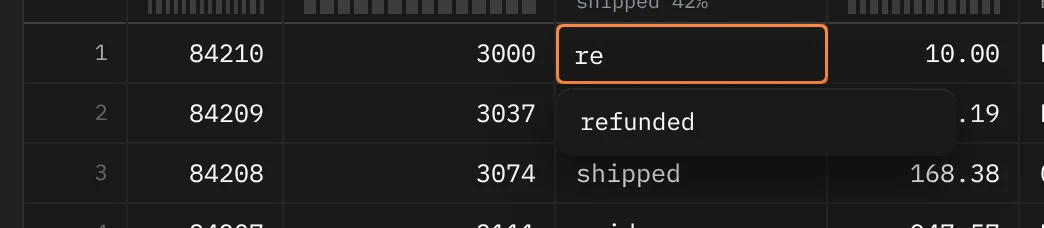
Adding rows
Insert row ⌘I, from the cell menu or the WHERE line's … menu, adds a new row at the top of the grid. Its cells read default: anything you leave that way is sent as DEFAULT, so sequences, now() and other column defaults fill in. The editor opens on the first column that has no default, ready for a value. Click the row's × to remove it before you commit.
Duplicate row ⌘D copies the selected rows as new rows. Key columns that have a default are left as default so the database gives the copies their own keys. Binary values aren't copied.
Deleting rows
Select whole rows by clicking or dragging their row numbers, then press ⌫. They're marked for deletion and struck through. Press ⌫ again on marked rows to unmark them. You can also delete the row in Quick Look.
Pasting
⌘V on a selected cell pastes tab-separated text (copied from a spreadsheet, or from Rowkery) as staged edits, starting at that cell and filling right and down. A toast says Pasted 6 cells, or how many fell outside the table. The text NULL pastes NULL, and an empty value pastes NULL in a column that isn't text.
Staged changes
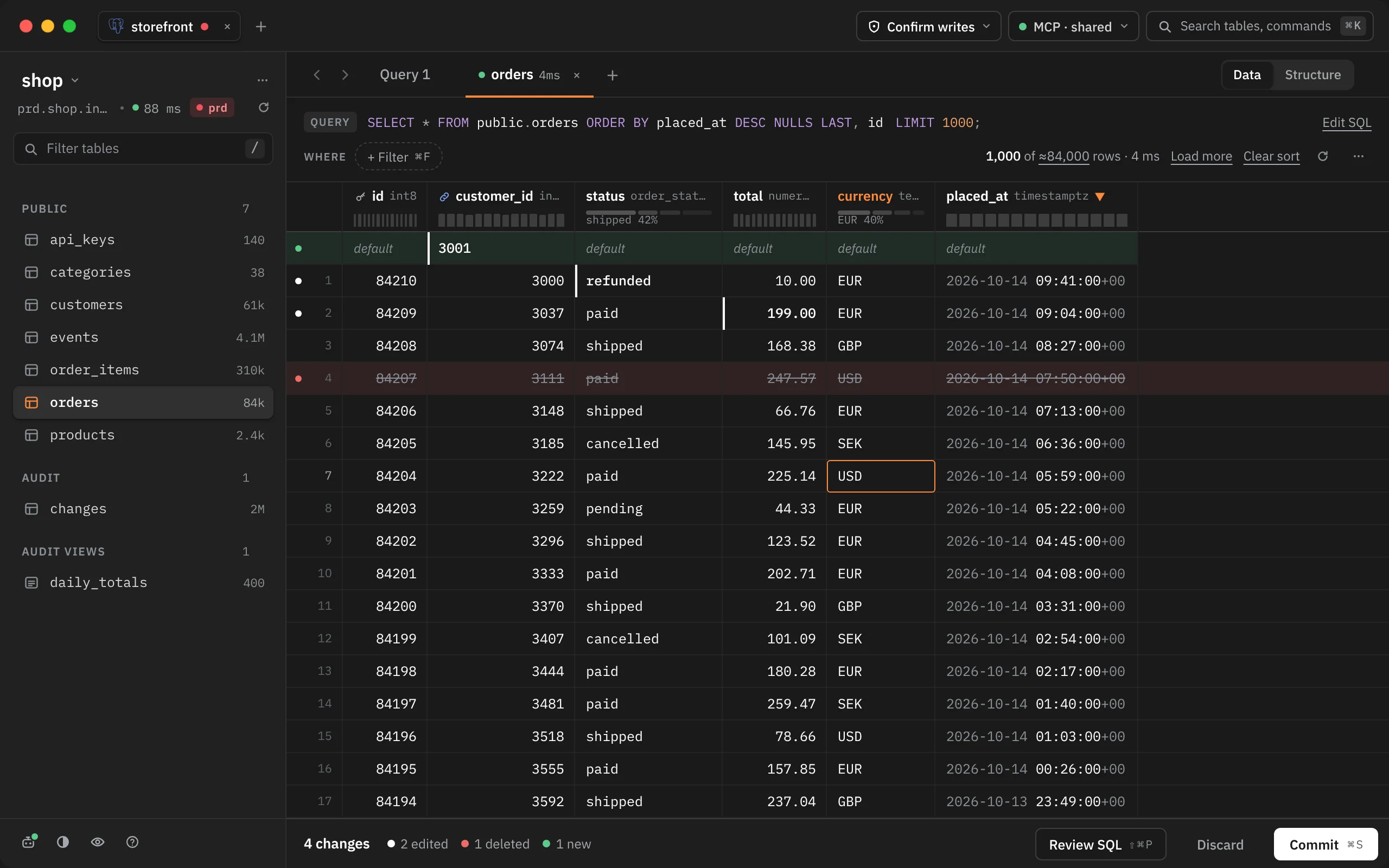
Each change shows in the grid at once:
- An edited cell carries a mark. Hover it to see the old value (Was paid · Esc reverts). Select it and press Esc to put the old value back.
- A dot in the row's gutter marks the row: the text colour for an edited row, red for a row marked for deletion, green for a new row.
Changes are tied to each row's primary key, so they stay with the right rows when you sort, filter or load more pages. They're saved with the tab: quit Rowkery with changes staged and they're still there when you come back, and reopening a closed tab with ⇧⌘T brings its changes back too.
The edits bar

While you have changes staged, a bar at the foot of the grid counts them and holds three buttons:
| Button | What it does |
|---|---|
| Review SQL ⇧⌘P | Shows the statements Commit will run |
| Discard | Drops every staged change in the tab |
| Commit ⌘S | Runs them in one transaction |
Discard shows a toast, Discarded 4 edits, with Undo (⌥⌘Z) for 10 seconds. Esc in the grid also discards when there's nothing else for it to close or cancel. See Undo and Esc.
Reviewing the SQL
Review SQL ⇧⌘P opens the statements in the inspector column beside the grid, one card per statement with a summary on top, such as orders · id 84209 · total 89.19 → 199.00.
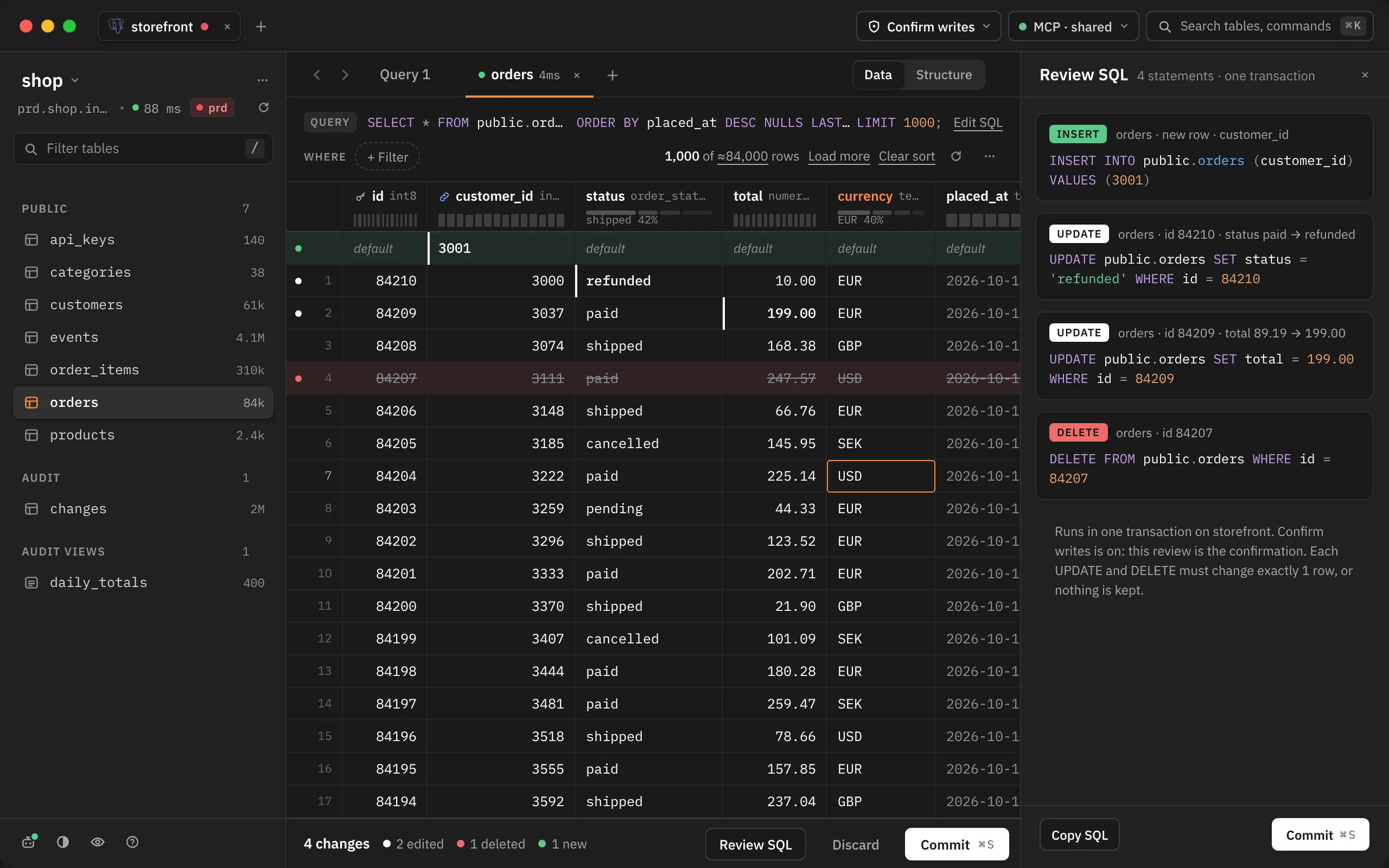
- New rows come first, in the order you added them, then updates, then deletes.
- Each UPDATE and DELETE names its row by the whole primary key.
- Values are written as literals of the column's type.
- A new row with nothing filled in becomes
INSERT … DEFAULT VALUES.
The note under the cards says what Commit will do on this connection: write at once (safe mode off), count this review as your confirmation (Confirm writes), or write nothing (Read-only). Copy SQL copies the whole transaction. Commit ⌘S (or ⇧⌘↵) runs it, and Esc closes the review.
Committing
Commit ⌘S runs every staged change as one transaction. Each UPDATE and DELETE must change exactly one row; if one changes none (someone else deleted that row) or more than one, the whole transaction is rolled back and nothing is kept.
While it runs, the bar reads Committing…. When it's done it says what changed, such as Updated 1 · Inserted 1 · Deleted 1 · 24 ms, and the table reloads. If it failed, the bar says Nothing changed and why (for example UPDATE public.orders WHERE id = 99 changed 0 rows), your changes stay staged, and Commit becomes Retry.
Edits you make while a commit runs stay staged afterwards for the next one.
With Confirm writes on
On a connection set to Confirm writes, Commit from the edits bar stops first and shows the exact SQL above the grid. The edits bar says it's waiting, and Commit there is disabled until you choose.

Commit ⇧⌘↵ runs it; Keep editing Esc goes back with your changes still staged. Committing from Review SQL skips this step, because you've already read the statements there. See Environments and safe mode.
Where the commit runs
On Postgres the commit runs on the tab's own session; on SQLite, on a fresh connection to the file. Rowkery is careful not to save something you didn't mean to:
| Message | What it means |
|---|---|
| This tab has a transaction open. Commit or roll it back before saving edits. | You ran BEGIN in this tab. Your edits never join your own transaction |
| This tab is still busy with a query; nothing was saved. | Wait for the query to end, or cancel it, then commit again |
| Every connection this database allows Rowkery is busy; nothing was saved. | Try again once a query ends |
| … didn't answer within 20 s, so it was stopped and nothing was saved. | Each step has 20 seconds to answer |
| The connection dropped during COMMIT, so the changes may or may not be saved. Reload the table to check. | Rowkery never retries a COMMIT, because it can't know whether the first one landed |
| The changes moved since you confirmed them. Review them again. | Your staged changes changed between confirming and running |