Help
Troubleshooting
What to do when Rowkery won't open, can't connect, can't be seen by your agent, or refuses something, with every message it shows and what it means. If your problem isn't here, send a report from inside the app.
macOS won't open Rowkery
Rowkery is in alpha and isn't signed by Apple yet, so the first time you open it, macOS stops it. It says Rowkery "can't be opened" because Apple can't check it, or, for a copy that was downloaded, that it "is damaged and can't be opened". Neither means anything is wrong with the app. Allow it once in either of these ways.
Open Anyway
Try to open Rowkery once, so macOS has seen it. Then open System Settings › Privacy & Security, scroll to Security, and choose Open Anyway next to the line about Rowkery. Confirm with your password when asked.
Or clear the download flag in Terminal
This also fixes the "damaged" message. Run it once after you drag Rowkery into Applications:
xattr -dr com.apple.quarantine /Applications/Rowkery.app
Updates are still checked. Even without Apple's signature, every update is signed by the Rowkery team and the updater refuses one whose signature doesn't match. Security and privacy has the details.
Keychain prompts
Rowkery keeps your passwords in the macOS Keychain. Because the app isn't signed by Apple, macOS only trusts the exact copy that saved an item. So you'll see macOS ask whether Rowkery may use an item in your keychain:
- the first time each connection's password is read after you install Rowkery,
- again after each update, since to macOS a new unsigned build is a different app,
- when your agent first reads a connection, since the MCP server is the same Rowkery app reading the same item.
Rowkery keeps one keychain item per connection, holding all its secrets, so you're asked once per connection rather than once per password. Choose Always Allow to stop the prompt for that item until the next update. If you choose Deny, that connection can't log in this time, and an agent can't get stand-ins for its sensitive columns (it gets a refusal instead). Rowkery remembers a denial until it restarts, so it doesn't ask again for every query.
Couldn't connect
When a connection fails, the window shows Couldn't connect in place of the editor, with a one-line cause, the error exactly as the server or system gave it, and three buttons:
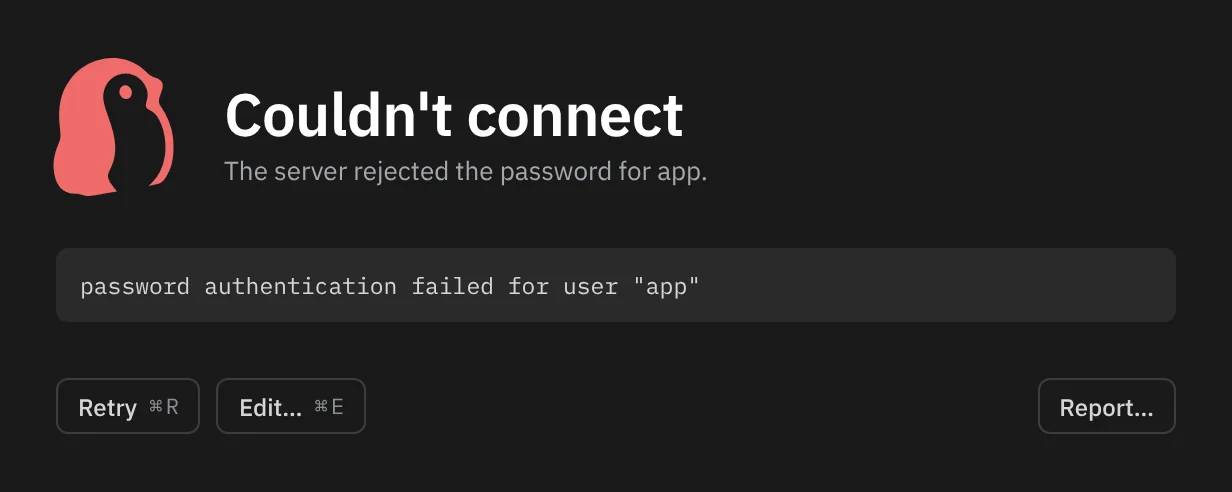
- Retry ⌘R connects again.
- Edit… ⌘E opens the connection's form with the field the error is about marked, such as Password.
- Report… opens Report an issue with the error included.
What each cause means
| Cause line | What to do |
|---|---|
Nothing is listening on HOST:PORT. | The server isn't running, or the host or port is wrong. Check that Postgres is up and which port it uses |
HOST:PORT did not answer in 10 s. | The server didn't answer within 10 seconds. A firewall, a VPN you aren't connected to, or a database that only accepts certain IP addresses is the usual reason |
The name HOST could not be resolved. | The host name doesn't exist, or needs a VPN or private DNS. Check the spelling of Host |
The server rejected the password for USER. | The password or user is wrong. Edit the connection and type the password again |
role "NAME" does not exist | The server has no user by that name. Check User |
database "NAME" does not exist | The server has no database by that name. Check Database, or connect to postgres and switch with ⇧⌘D |
Couldn't verify the server's certificate. Check SSL under Advanced. | SSL is set to Verify and the certificate didn't check out. See Which SSL setting to pick |
The server doesn't accept SSL. Check SSL under Advanced. | The server has SSL turned off. Choose Prefer or Disable |
The server's certificate was not accepted. | Another SSL problem. The raw error below it says which |
The SSH host key for HOST has CHANGED. Nothing was sent. | See SSH host key changed |
The SSH host HOST is new to this Mac. | Rowkery hasn't seen this SSH server before and Trust the host key on first connect is off. Turn it on under Advanced, SSH tunnel, or check the key with the server's owner first |
The SSH host HOST did not answer. | The SSH server didn't answer within 15 seconds, or refused the connection. Check the SSH host and port |
The SSH host HOST refused the key or password. | The SSH user, key file or password is wrong |
A Google Cloud SQL connection has causes of its own, such as a missing gcloud login or the Cloud SQL Client role. When it can't connect lists them.
When no cause fits, the raw error stands alone. A few you may meet there:
| Raw error | What to do |
|---|---|
Couldn't verify the server's certificate (REASON). Check SSL under Advanced. | Verify failed; the reason says why, such as an unknown issuer or a name that doesn't match the host |
Couldn't read CA certificate PATH: … or No certificates found in PATH | The file chosen under CA certificate is missing or isn't a PEM certificate |
SSH private key path is required | Auth is set to Key file but no file is chosen |
Could not read key file: … or Invalid SSH key: … | The key file can't be read, or isn't a private key Rowkery understands |
SSH password not stored | Auth is set to Password but no SSH password is saved. Edit the connection and type it |
While you fill in the form
The New connection form tries the connection on its own once Host, Database and User are set, and puts the server's reason under the field it's about. After two failed logins in a row it stops and says Stopped trying after two failed logins · change a field or Test, so it can't lock your account by retrying. Change a field or press Test to try again.
Which SSL setting to pick
SSL is under Advanced in the connection's form. A new connection to another machine starts on Verify; one to this Mac starts on Prefer.
| Setting | Use it when |
|---|---|
| Verify | The server has a certificate from a public authority, or from your company's authority that's in your Mac's keychain. Rowkery checks the certificate chain and that it names the host, like sslmode=verify-full |
| Verify with a CA certificate | The server's certificate comes from a private authority, as with many hosted databases. Download the provider's CA bundle and choose it under CA certificate |
| Require | The server uses a self-signed certificate and you can't get its CA. The connection is encrypted, but the certificate isn't checked |
| Prefer | A database on this Mac or your own network. Uses SSL when the server offers it |
| Disable | A server without SSL, such as a local Docker container |
Hosted Postgres has the settings for common providers.
SSH host key changed
Rowkery remembers each SSH server's host key the first time it connects, in ssh_known_hosts in Rowkery's folder. If a server later shows a different key, Rowkery stops before sending anything, since that's what a server pretending to be yours would look like.
If the server's owner tells you the key changed on purpose (the server was rebuilt or moved), open ~/Library/Application Support/Rowkery/ssh_known_hosts in a text editor and delete the line that starts with that server's host:port. The next connect treats it as new and, with Trust the host key on first connect on, remembers the new key.
Waiting for a free connection
Each saved connection holds at most 10 sessions to the server, shared by its windows and tabs. When all of them are busy, a new run says Waiting for a free connection with the time, and starts as soon as one frees. Esc cancels the wait.
The agent can't see Rowkery
Work through these in order.
- Share a connection. On the Agents page (⇧⌘A) the connection's switch must be on. A card that says Not shared is off; one that says Sharing ended … had a time limit (1 hour, or Today, which ends at midnight) that ran out. Turn it on again.
- Share a database and its tables. Open the card's Edit access. A connection with no database picked answers the agent with
No database on this connection is shared yet. - Restart the client. After Connect an agent, quit Claude Desktop (⌘Q) and open it again. In Claude Code, start a new session: one that was already open won't see Rowkery until you restart it.
- Keep Rowkery where you connected it. Connect an agent adds the path of the Rowkery you ran it from. If you moved the app afterwards, or ran it from the disk image or Downloads, the agent can't start it. Move Rowkery into Applications, open it from there, and run Connect an agent again. It shows the old entry and offers Replace.
- Claude Code isn't found. If Connect an agent says "Rowkery looked for claude in your shell's PATH and didn't find it. Install Claude Code (claude.com/claude-code), then try again.", either Claude Code isn't installed, or your login shell's PATH doesn't include the folder it's in. Rowkery reads PATH from your login shell because an app opened from the Dock doesn't get the one your terminal has. Make sure
which claudeworks in a new Terminal window, or run the command the sheet shows yourself with Copy command. - Claude Desktop's config is broken. If Connect an agent says "Claude Desktop's config file isn't valid JSON.", Rowkery leaves the file as it is. Fix the file, or add the entry the sheet shows by hand with Copy entry.
Rowkery doesn't need to be open for an agent to read. The client starts its own copy in the background with --mcp. A change the agent proposes waits until you open Rowkery to review it.
The agent's queries are refused
A refusal is the guard working: the agent gets the reason as a sentence and usually rewrites its query. The Agents page shows each refused call in the activity log with the reason under it. The common ones:
| The agent was told | Why |
|---|---|
Refused: DELETE is not a read. This server only runs SELECT queries. | Agents can only read. To change data they must use propose_change, which waits for you |
Refused: 2 statements. Send one SELECT per call. | One statement per call |
Refused: this reads a table the user hasn't shared with agents in Rowkery. … | The query reads a table you didn't tick, maybe through a view or a join. Tick every table it needs in Edit access, or leave it hidden |
Refused: the plan reads public.events (~4100000 rows; indexed: …) end to end. … | The query would read a table of over 100,000 rows from start to end. The agent should filter on one of the indexed columns the message lists |
Refused: pg_read_file() reads or writes files on the database server. … | Functions that touch files, other hosts, other sessions or settings are refused, as are functions defined in your database |
Refused: players.email is masked. … | You marked the column as sensitive. The agent can return or count it (on SQLite only return it), but not filter, sort, group or join on it |
Stopped after 10 s (statement timeout). … | The query ran past 10 seconds |
No shared connection called "NAME". … | The connection isn't shared now (see above) |
Every message an agent can get, with what it means, is on MCP tools.
A query is stuck
Press Esc or ⌘., or click Cancel beside the running time. Rowkery asks the server to cancel the query.
If the server doesn't answer, for example because the connection dropped while your Mac slept, the button turns into Force stop. Click it, or press Esc again, and Rowkery stops waiting at once. It also does that by itself 3 seconds after an unanswered cancel. To stop every running query in every tab, choose Stop all queries in ⌘K.
Rowkery feels slow
- Big results. A query tab loads every row its query returns, so add a
LIMITto load fewer. A table tab loads 1,000 rows at a time and Load more gets the next page; its page-size control also offers 5,000 and All. A tab holds at most 1,000,000 rows and says Stopped at 1,000,000 rows when it gets there. To get a whole large result, use Export results… ⇧⌘E, which streams it straight to a file without loading the rows into the window. On a table tab, Copy all results as CSV in ⌘K does the same to the clipboard. - Hover prefetch. Prefetch on hover, under Advanced in a Postgres connection's form, reads a table's first 200 rows while the pointer rests on its name, so a click shows them at once. It's off by default. It reads on a session of its own, so turn it off if the server is busy.
- A slow server. For a query that's slow on the server, ⌘E shows its plan with the slowest step marked, and Show sessions in ⌘K shows what else is running and what is blocking what. See Query plans and Sessions.
- Measure it. Timings in ⌘K shows how long the last launch, click and query took against their budgets, with Copy. Paste that into a report.
Resetting Rowkery
Try a clean profile first
To see whether a problem comes from your saved state, start Rowkery with an empty folder of its own. Quit Rowkery, then in Terminal:
ROWKERY_CONFIG_DIR="$HOME/rowkery-clean" /Applications/Rowkery.app/Contents/MacOS/Rowkery
It starts as on a first launch, with the sample database and none of your connections. Your real settings stay as they were. While ROWKERY_CONFIG_DIR is set, Rowkery also leaves your keychain alone and keeps any passwords you type in an encrypted file in that folder instead. Quit, and open Rowkery normally to go back.
Start over
Quit Rowkery
Rowkery writes config.json about once a second while it runs, so a file deleted under a running app comes back. Quit it with ⌘Q first.
Move config.json out of the way
Open ~/Library/Application Support/Rowkery/ in Finder (Go › Go to Folder…) and move config.json to the Desktop rather than deleting it, so you can put it back. It holds your connections, windows, tabs and their SQL, history, sharing settings and sensitive columns.
Open Rowkery
It starts as on a first launch. To keep your connections, put the old file back instead.
Your passwords stay in the keychain under the old connections. Where Rowkery keeps things lists every other file in the folder and what deleting it does.
The sample database has its own reset: Reset the sample database in ⌘K puts back its original rows, and Open the sample database brings it back after you deleted it.
Report an issue
Choose Help › Report an Issue…, or Report an issue… in ⌘K. Couldn't connect, a failed query and Rowkery's error screen also have a Report… button, which opens the same sheet with the error included.
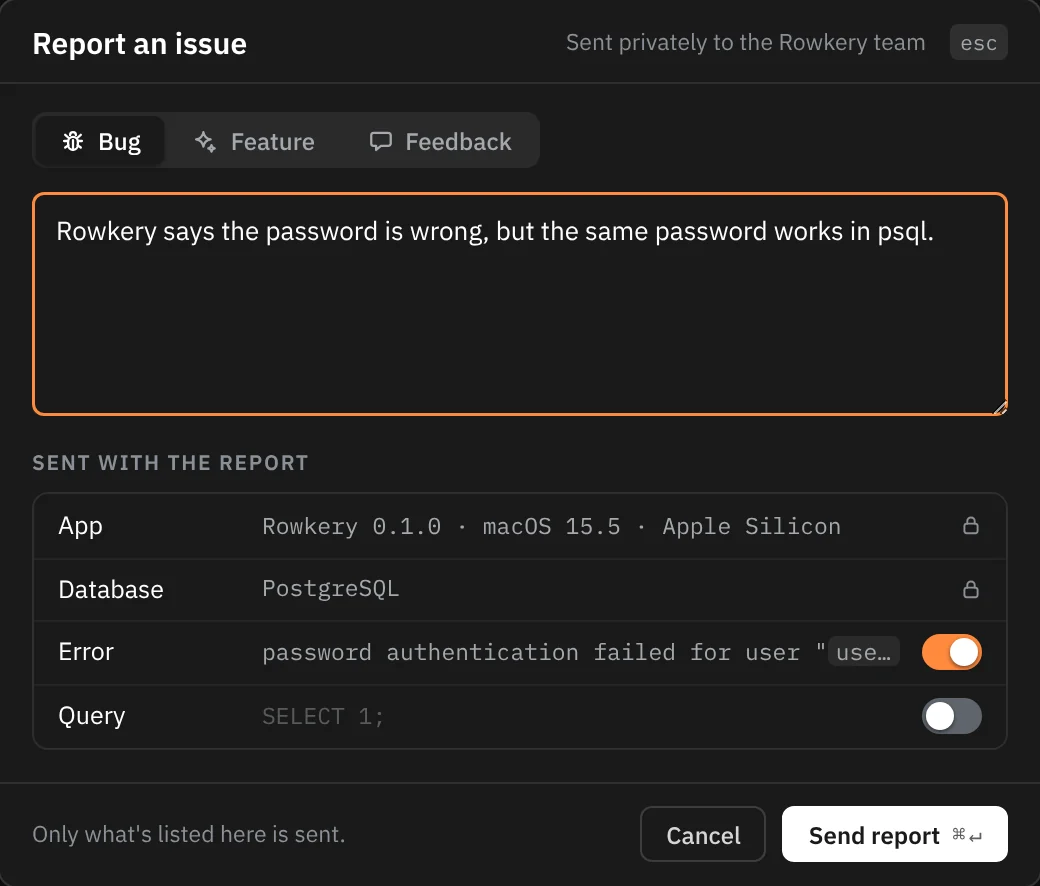
Pick Bug, Feature or Feedback, write what happened, and press Send report ⌘↵. Under Sent with the report the sheet lists exactly what goes, and nothing else does:
| Part | When it's sent |
|---|---|
| Your note and its type | Always |
| App | Always: Rowkery's version, your macOS version and Apple Silicon or Intel |
| Database | Always, when a window has a connection: PostgreSQL or SQLite, the server version, and "over SSH" when there's a tunnel |
| Error | Only with its switch on. It starts on when you came from an error's Report… button. The host, SSH host, user, database name, file path, IP addresses and host names in it are replaced with ‹host›, ‹user›, ‹database› and ‹path› before you see it |
| Query | Only with its switch on, which starts off. The SQL in the current tab as written, up to 8,000 characters. It isn't masked, so read it before you turn it on |
The report has no name, email or account. It goes to Rowkery's report service, which files it as an issue in a private repository the Rowkery team reads and keeps nothing itself. Like any web request it sees your IP address, which it only uses to allow at most 3 reports a minute from one address.
If sending fails, the sheet says Not sent: with the reason (such as "Couldn't reach the Rowkery team") and offers Copy report and Try again. A build without the report service, such as one you built yourself, only offers Copy report. You can also open an issue on GitHub, which is public.
For a security problem, don't use either: see Report a vulnerability.