Agents
Choosing what to share
The Agents page decides which connections, databases and tables an agent can read, for how long, and shows every call it made. This page covers each control on it and the limits that apply whatever you share.
The Agents page
Press ⇧⌘A, click the Agents button at the foot of the schema column, or choose Window › Agents. The page takes the place of the schema column, editor and grid; the title bar stays. Press Esc or esc to go back to your window.
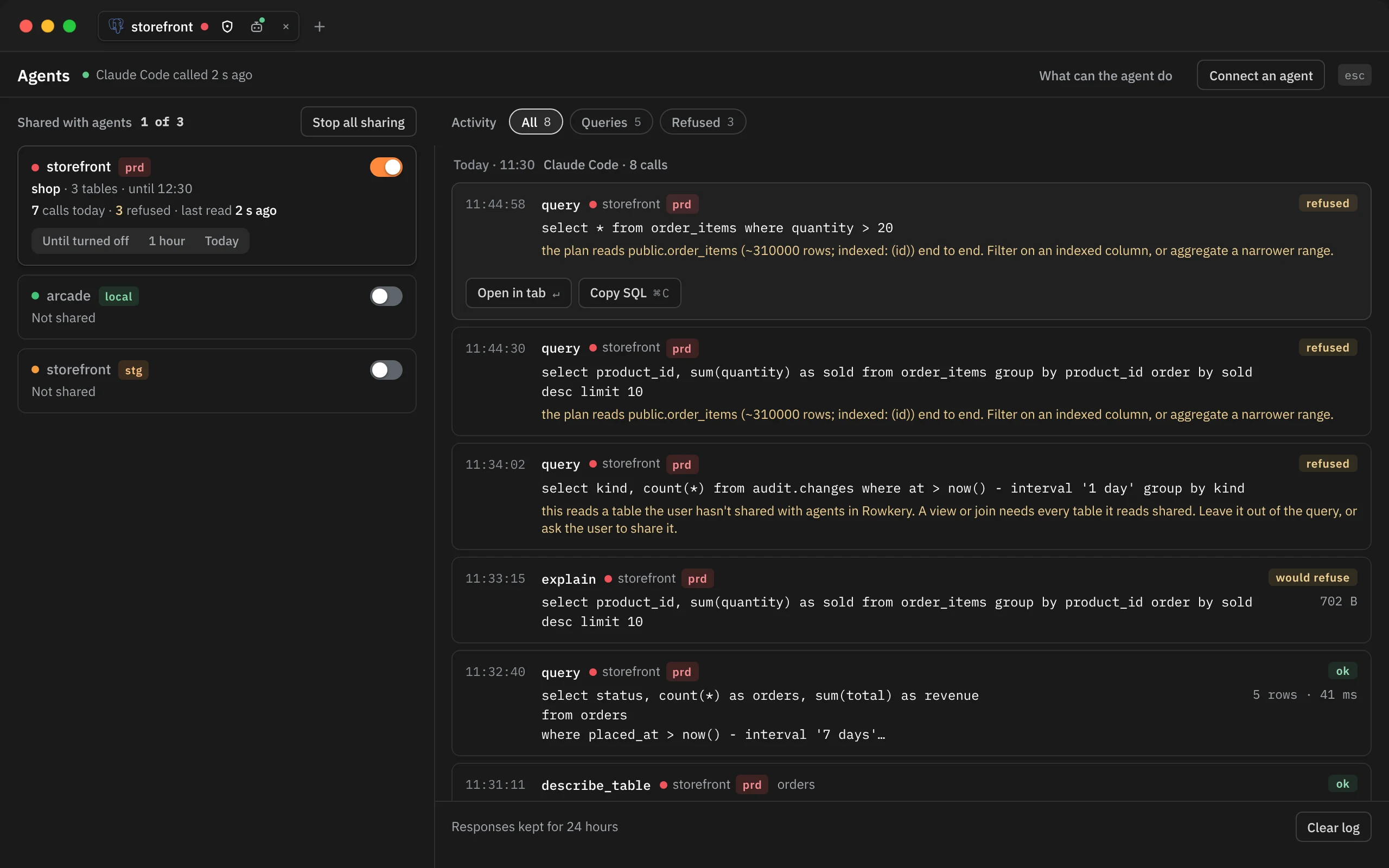
The page has two columns:
- Shared with agents on the left: one card per saved connection, shared ones first, with a count such as "1 of 3".
- Activity on the right: every call agents made, newest first.
The head line says who called last, such as "Claude Code called 12 s ago", with a green dot while the last call is under a minute old. What can the agent do opens a summary of the rules, and Connect an agent sets up Claude Code or Claude Desktop (see Connecting to agents).
In a narrow window the two columns stack, and an Access | Activity switch at the top jumps between them.
From ⌘K
| Command | What it does |
|---|---|
| Agents | Opens the page (⇧⌘A) |
| MCP activity | Opens the page at the log |
| MCP access: what agents can reach | Opens the page at the connection cards |
| Share this connection with agents | Shares the window's connection |
| Stop sharing this connection with agents | Stops sharing it |
| Edit MCP access: databases and tables | Opens Edit access for the window's connection, once it is shared |
| Connect Claude Code or Claude Desktop | Opens Connect an agent |
| Review proposed changes | Opens the review, while a change waits (see Proposed changes) |
Sharing a connection
Turn on the switch on a connection's card. Nothing is shared until you do: every connection starts with sharing off.
The first time you share a connection, Rowkery shares its own database and opens Edit access, where every table in that database gets ticked as soon as the list loads. Untick what the agent shouldn't see. If you stop sharing and share again later, your earlier picks come back.
You can also share from:
- the connection's sheet (Connection › Edit Connection…): turn on Share with agents (MCP) and save;
- ⌘K Share this connection with agents.
A toast confirms each change, such as "Shared with agents · storefront". The MCP server reads your settings again on every call, so a change applies to the agent's next call, with no restart.
What each card shows
| Line | Meaning |
|---|---|
| Name, environment tag and switch | The connection and whether it is shared |
| Second line | What is shared: the databases, how many tables, and "until 12:30" when there is a time limit. "Not shared" otherwise, or "Sharing ended 12:30" once a time limit has passed |
| Third line | Calls today, how many were refused, and when an agent last read it |
| Until turned off, 1 hour, Today | How long to share, while it is shared |
Click a shared card, or press ↵ or Space on it, to open its Edit access.
How long to share
| Choice | Sharing ends |
|---|---|
| Until turned off | When you turn the switch off. This is what the switch alone does |
| 1 hour | An hour from when you choose it |
| Today | At midnight, your Mac's time |
Choosing 1 hour again starts a fresh hour. When the time is up, Rowkery shows "Stopped sharing with agents" with the connection's name, and the card says "Sharing ended" with the time. The agent's next call finds the connection gone.
Edit access
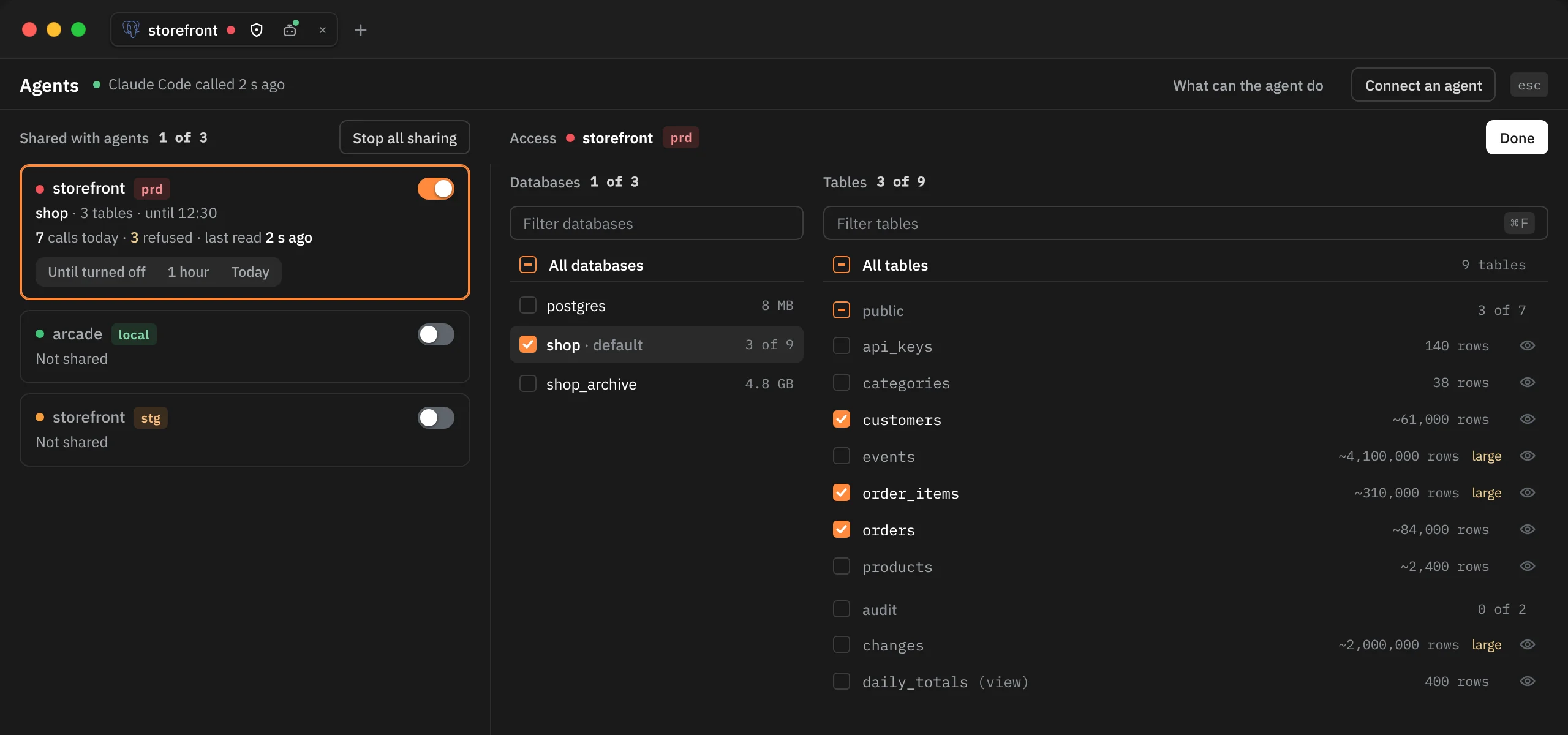
Edit access takes the log's place on the right. It lists the connection's databases, then the tables of the one you pick. Every tick saves at once; there is no Save button. Done or Esc closes it.
Databases
Each database has a box to tick and a name to click:
- Tick a database to share it. Every table in it is ticked once its list loads.
- Click its name to list its tables on the right.
- Untick it to stop sharing that database. To an agent it then reads as a database that doesn't exist.
The connection's own database says default. The figure beside each one is its size, or how many of its tables are shared ("3 of 9", "all 9"). On Postgres, Filter databases narrows the list and All databases ticks or unticks every database the filter shows. A SQLite connection has one database, shown as This file.
Tables
The tables are grouped by schema, each with its row estimate. Tables over 100,000 rows are tagged large, and views say (view) after their name.
- Tick a table to share it, or a schema row to share every table in that schema.
- All tables ticks or unticks every table in the list, or only the ones the filter shows.
- Filter tables (⌘F) narrows the list. Type several words to match names that contain all of them.
- The eye at the end of each row opens its columns, where you mark sensitive ones (see Sensitive columns and Presenting).
Shared tables are a list of names. A table created after you ticked its database stays hidden until you tick it too.
A connection shared before Rowkery had Edit access shares every database except its hidden tables. Its boxes can't be ticked until its databases have loaded, so a tick never unshares the rest by accident.
Views
A view is only as open as the tables it reads. Tick every table under a view, or any query on the view is refused. The same goes for a join: each table in it must be shared.
What the agent sees of hidden tables
A table you haven't ticked is left out everywhere the agent looks:
list_tablesandsearch_schemadon't list it.describe_tableanswers "No table called …", and leaves out foreign keys that point to it or from it.sessionsblanks the text of any query that names it.- A query whose plan reads it, directly or through a view, join or subquery, is refused: "this reads a table the user hasn't shared with agents in Rowkery."
- A partition goes with its parent table: shared when the parent is, hidden when it is hidden.
- On Postgres, the statistics tables (
pg_statistic) are refused, since they hold sample values from every column. Postgres's system catalogs aren't on your list either, so reading them directly is refused; the agent useslist_tablesanddescribe_tableinstead.
What agents can never do
These limits apply to every shared connection, whatever you tick. The same rules are on the page under What can the agent do.
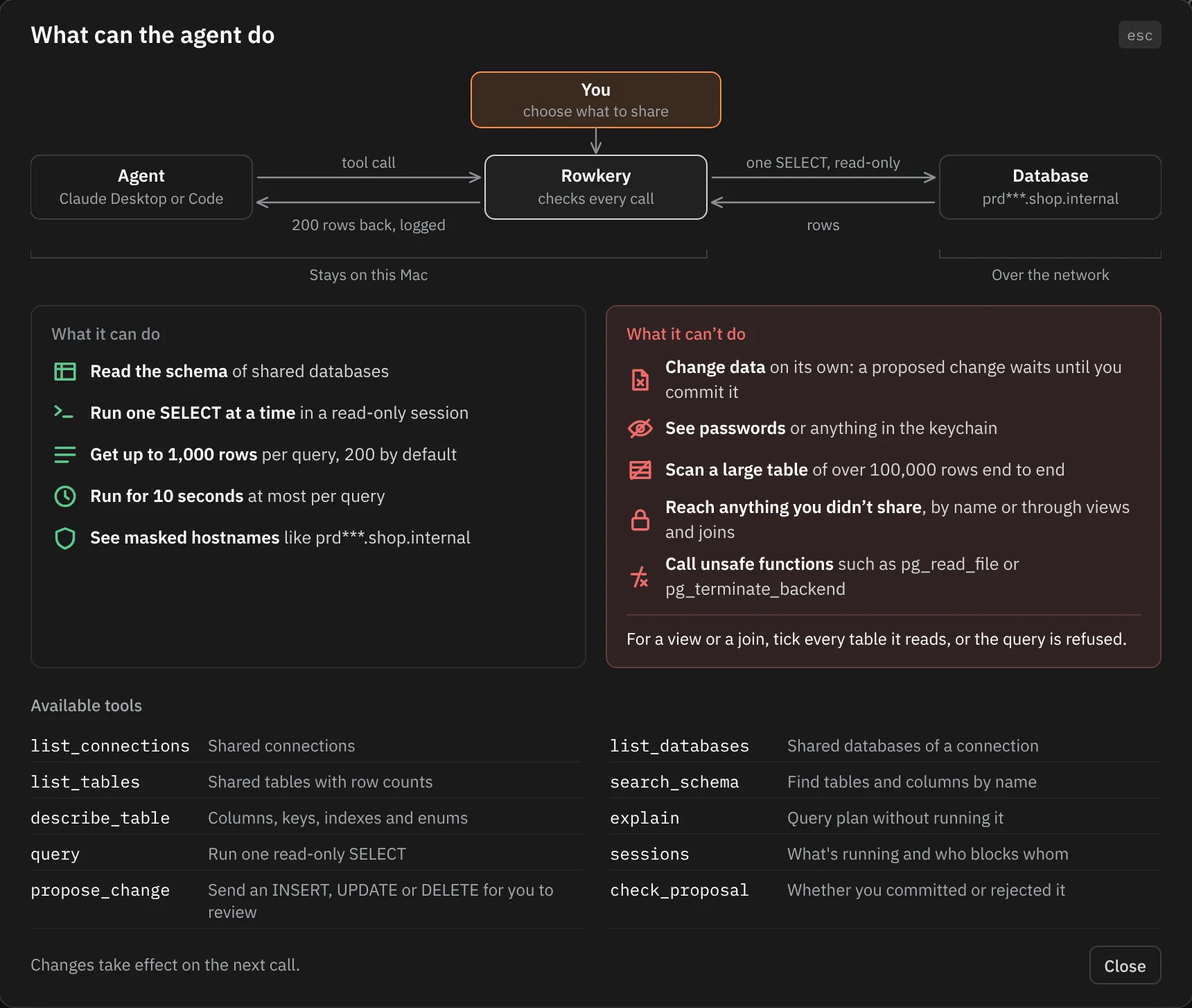
| Limit | Detail |
|---|---|
| No writes | A query must be one SELECT (or WITH, VALUES or TABLE), and it runs in a read-only session. A change goes through Proposed changes |
| One statement per call | Two statements in one call are refused |
| Rows | 200 by default; the agent can ask for up to 1,000 |
| Long text | Cells over 200 characters are cut |
| Response size | Rows stop once the answer passes 64 KB, and the agent is told |
| Time | Each statement stops after 10 seconds; a whole call, connecting included, after 20 |
| Large tables | A plan that reads a table of over 100,000 rows end to end is refused on Postgres. The agent gets the table's indexes so it can filter on one. On SQLite the query runs, with a note |
| Functions | On Postgres, only functions built into Postgres that compute on their arguments, like count, date_trunc or lower. Functions defined in the database are refused, because their bodies don't show in the plan |
| Server functions | Refused by name: reading files (pg_read_file), ending or cancelling sessions (pg_terminate_backend), changing settings (set_config), advisory locks, pg_sleep, network calls (dblink, http) and anything that runs a query given as text |
| Other sessions' queries | pg_stat_activity and pg_stat_statements are refused, because they show the values typed into other people's queries. The sessions tool shows them with every value replaced by ? |
| Hosts and passwords | Agents see a masked host such as prd***.shop.internal, and never a password or anything in your keychain |
A large-table refusal counts only when the whole table is read: a SELECT * with no filter stops at the row cap and is fine, while a filter on a column without an index, or a count over the whole table, is refused.
When a query is refused, the agent gets the reason in plain words, so it can try a narrower one. explain shows a plan without running it, and says when query would refuse it.
Result samples
So you can see what an agent got back, Rowkery keeps the start of each response (its first 512 bytes) for 24 hours, on this Mac only, in mcp-samples.jsonl beside your config. The activity log shows it under Response.
To keep none for a connection, open its sheet (Connection › Edit Connection…) and turn off Keep result samples, under Share with agents, and save. Its calls then show "Not kept" in place of the response. The answer to list_connections names every shared connection, so it is kept only while none of them has samples off.
The activity log
Every call an agent makes is listed, newest first, grouped by agent session. A session starts each time an agent starts Rowkery's server, and its header says when, which agent, and how many calls it made.
Each entry
| Part | What it shows |
|---|---|
| Time | When the call came in, to the second |
| Tool | Which tool it called: query, describe_table, explain … |
| Connection | Its name, environment tag, and the database when it isn't the connection's own |
| Target | The table for describe_table, the text for search_schema |
| SQL | The query as the agent wrote it |
| Verdict | ok, refused, failed, or would refuse (an explain whose query would be refused) |
| Size | Rows and milliseconds for a query, the response size for other tools |
| Reason | For a refused or failed call, the reason the agent was given |
A call in full
Click a call, or move to it with ↑ ↓, to open it.
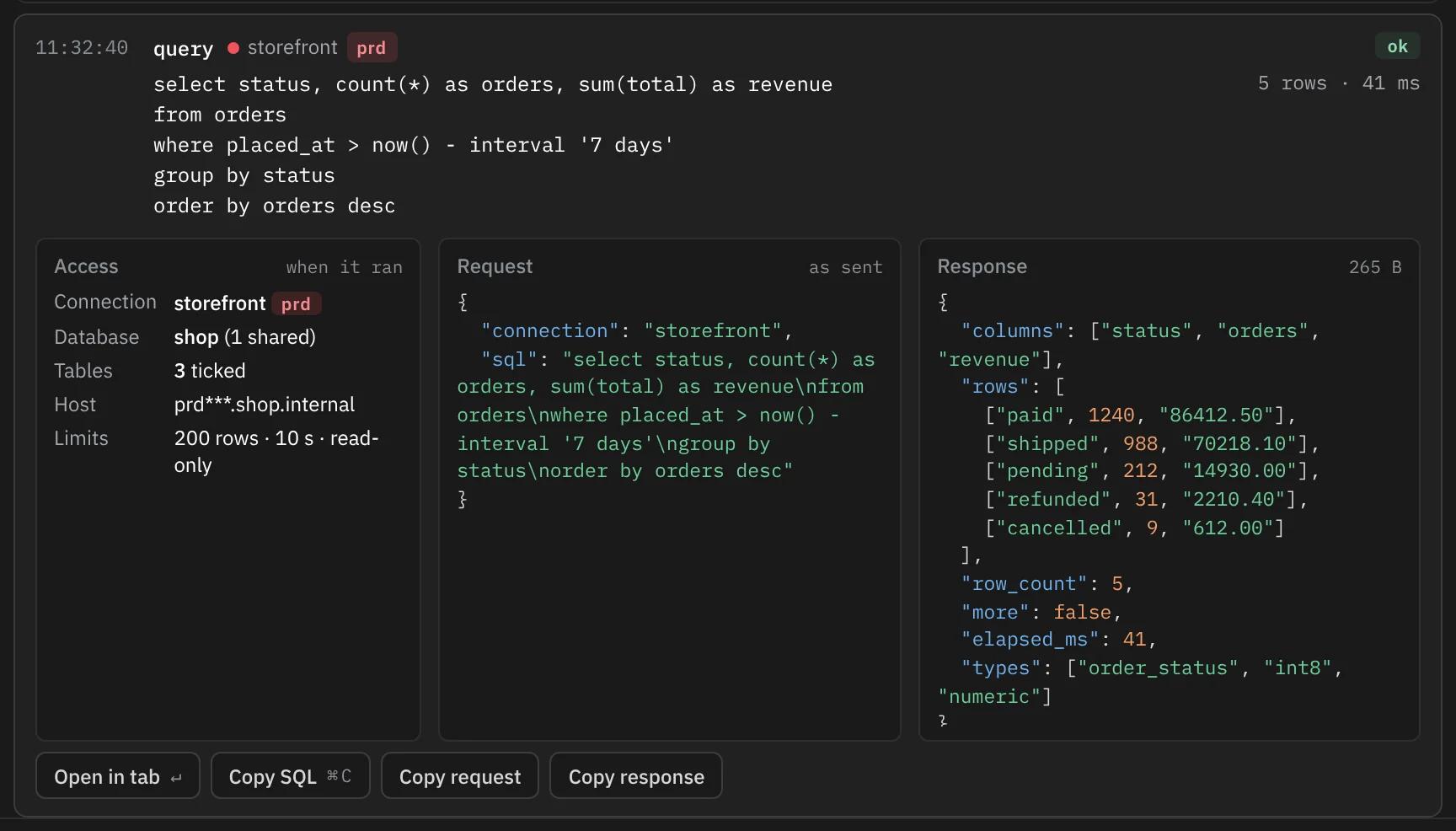
| Box | What it holds |
|---|---|
| Access, when it ran | What was shared at the moment of the call: the connection, how many databases, how many tables were ticked, the host as the agent saw it, and the limits |
| Request, as sent | The arguments exactly as the agent sent them, cut after 4 KB |
| Response | The start of what went back, and its full size; "Not kept" when samples are off or past 24 hours |
| Action | Key |
|---|---|
| Open in tab: the SQL in a new query tab named Agent query, on that connection and database. It doesn't run | ↵ or double-click |
| Copy SQL | ⌘C |
| Copy request, Copy response | Buttons |
Filtering the log
The buttons above the list show All, Queries (calls with SQL) or Refused, each with its count. When agents have called more than one connection, a button per connection narrows the list to it; click it again to show all. The page lists the newest 300 calls that match.
Clearing the log
Clear log, at the log's foot, asks once: Keep or Clear all. Clearing removes every entry and every result sample, and can't be undone.
The log lives in mcp-log.jsonl beside your config. It records each call's time, tool, arguments, connection, database, what was shared, SQL, row count, time taken, response size and verdict, and never the rows themselves. Past 8 MB it starts a new file and keeps one older one.
While you work
You don't need the Agents page open to see what agents do.

- The agent mark. The shown window's pill carries a small agent icon while its connection is shared. Any pill whose connection an agent read in the last minute shows it too, with a green dot; the dot goes 60 seconds after the last read. Click the mark to open the Agents page.
- The refusal toast. When an agent's query is refused, a toast says so, such as "MCP refused a full read of order_items", with View to open the log. It never replaces an Undo toast that is still showing, and ↵ doesn't trigger it.
- The Agents button at the foot of the schema column has a green dot while the window's connection is shared.

Rowkery reads the log every 3 seconds while a connection is shared or the Agents page is open, and only while the window is visible.
Stop sharing
Any of these stops sharing a connection:
- turn off its switch on the Agents page;
- Stop all sharing, above the cards, for every shared connection at once;
- ⌘K Stop sharing this connection with agents;
- Share with agents (MCP) in the connection's sheet, once you save it.
It takes effect on the agent's next call, which then finds no such connection. Your database and table picks are kept for the next time you share it. A change that agent proposed can't be committed until the connection is shared again.