Working with data
Sessions
The Sessions tab shows what else is connected to your Postgres database right now: who, what they're running, and what is blocking what. From there you can cancel a query or end a session.
Open the Sessions tab
Choose View › Sessions, or Show sessions in ⌘K (it also answers to locks, blocking, kill and pg_stat_activity). It opens as a tab called Sessions beside your query tabs. Each window has at most one; asking again shows the one you have. It's saved with your other tabs.
Sessions is for Postgres connections, and it needs the window to be connected.
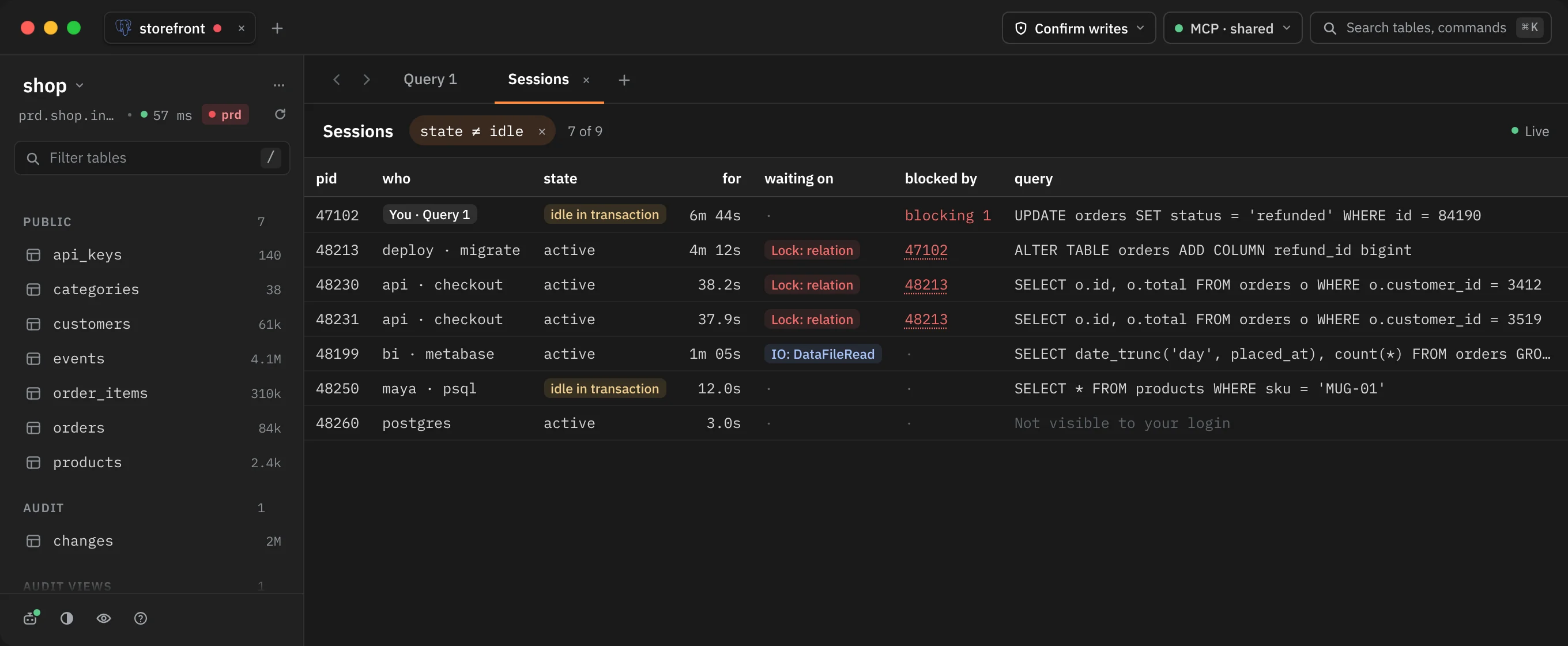
What the list shows
Each row is one other client session on this database. Rowkery reads them from pg_stat_activity on a separate session of its own, so reading the list never uses a query tab's session or its transaction. That reading session isn't listed.
| Column | What it shows |
|---|---|
| pid | The server's process id for the session |
| who | The login and the application name. Your own query tabs in this window read You · and the tab's title |
| state | active, idle, idle in transaction and so on. A session idle inside a transaction is tagged, since it may be holding locks |
| for | How long it's been in that state: an active query since it started, an idle transaction since the transaction began, anything else since the state last changed |
| waiting on | What the session is waiting for, such as Lock: relation or IO: DataFileRead |
| blocked by | The pids of the sessions holding the lock it waits for, as buttons. A session that blocks others shows blocking and how many |
| query | The current or last query, on one line. Hover it for the whole text |
Sessions that block others come first, then sessions waiting on a lock, then the rest, longest first.
When your login isn't allowed to see another session's query, the query reads Not visible to your login. Postgres shows other logins' queries only to a superuser, a member of that login's role, or a login with pg_read_all_stats.
Idle sessions
The list starts with the state ≠ idle filter on, so you see only sessions doing something. The count beside it, such as 7 of 9, says how many are shown out of all of them. Click the × on the filter to show idle sessions too, and Hide idle to filter them out again.
If nothing is shown, the list says Nothing running. Every other session is idle. or, when there's no other session at all, No other sessions on this database.
Live updates
While the tab is shown and the window is in front, the list reads the server again every 2 seconds, and the times in for count up every second. The bar shows Live.
Updates pause while the pointer is over the list or a session is picked, so rows don't move under you; the bar then reads Paused while you pick. If a read fails, it reads Couldn't read sessions; hover it for the reason.
Look at one session
Click a row to pick it and see its details in the inspector on the right. ↑ and ↓ move the pick, and Esc or a second click lets go. Click a pid under blocked by to jump to the session that's blocking.
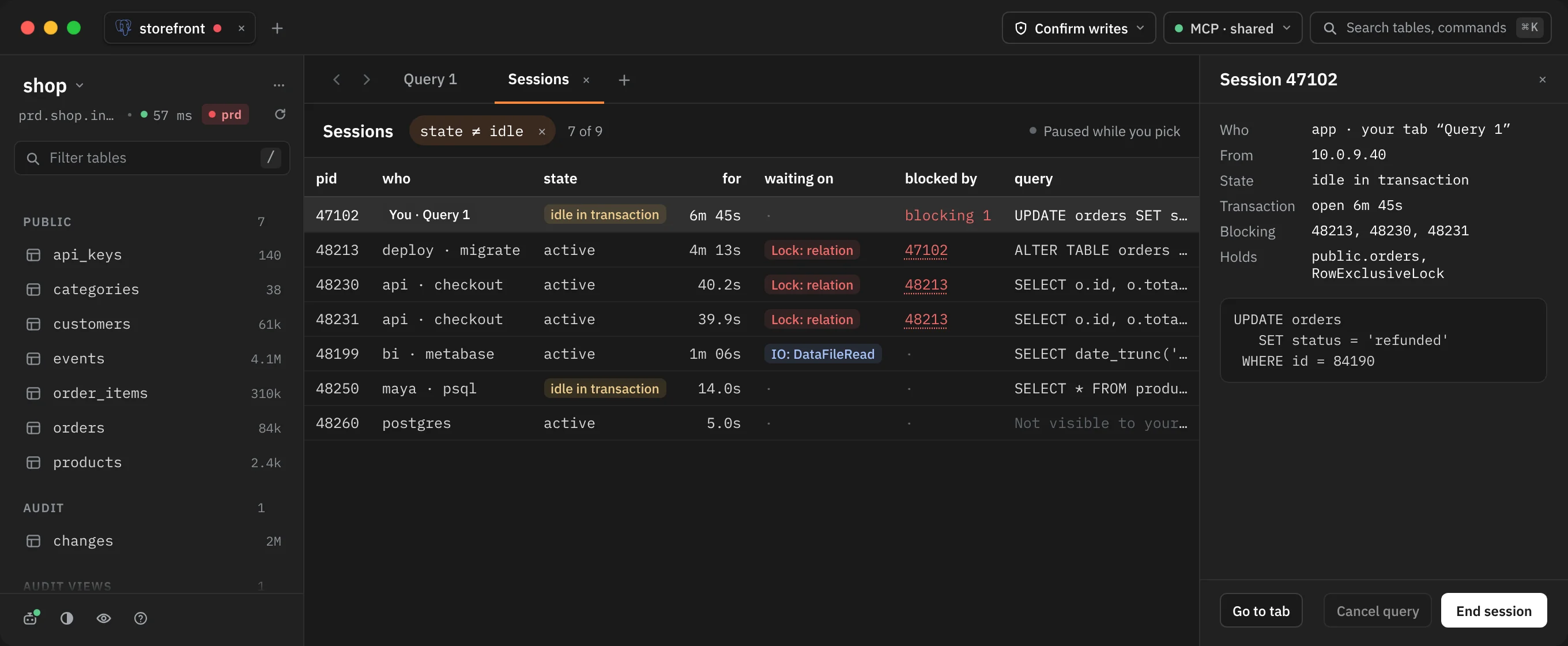
| Detail | What it shows |
|---|---|
| Who | The login and application, or your tab's name for one of your own |
| From | The client's address |
| State | The session's state |
| Transaction | How long its transaction has been open |
| Waiting on | What it waits for |
| Blocked by | The sessions it waits on |
| Blocking | Every session waiting on it, directly or down the chain |
| Holds | The tables it holds locks on, with the lock mode |
Below the details is the full query, or Your login can't read this session's query.
For one of your own tabs, Go to tab takes you to it.
Cancel a query or end a session
The inspector has two buttons:
- Cancel query stops the query the session is running (
pg_cancel_backend) and leaves the session connected. It works only on an active session; otherwise it's greyed out with "No query is running in this session". - End session disconnects the session (
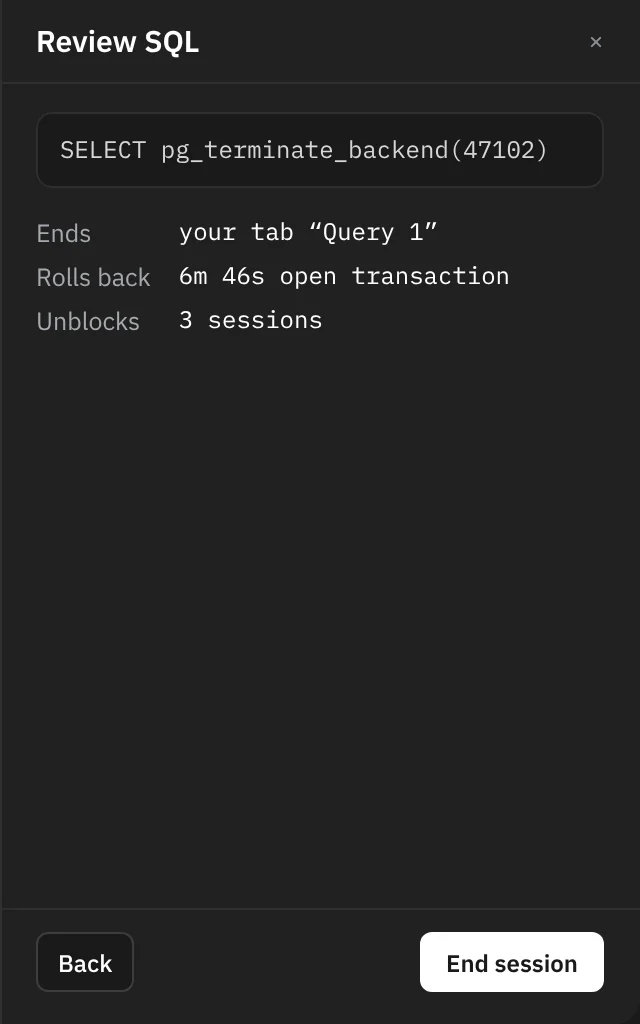
pg_terminate_backend). Its open transaction is rolled back, and the sessions it was blocking can go on.
What happens when you press one depends on the connection's safe mode:
| Safe mode | Cancel query | End session |
|---|---|---|
| Off | Runs at once | Asks first |
| Confirm writes | Asks first | Asks first |
| Read-only | Refused | Refused |
Ending a session always asks, even with safe mode Off, because nothing can bring back the transaction it rolls back.
When Rowkery asks, the inspector shows Review SQL with the exact statement and what it will do: Ends or Stops (whose session), Rolls back (how long its transaction has been open) and Unblocks (how many sessions are waiting on it). Press the button again to go ahead, or Back to leave it.
On a read-only connection, both show "This connection is read-only, so its sessions can't be stopped from Rowkery."
After you stop one
A toast confirms it: Ended session 47102 or Cancelled the query in session 47102, with how many sessions it unblocked. If the session finished on its own first, the toast says Session 47102 had already ended.
Who can stop a session
Postgres lets you stop sessions of your own login, or anyone's if your login is a superuser or has pg_signal_backend (which still can't stop a superuser's sessions). For a session you can't stop, both buttons are greyed out with "Your login can't stop this session".
Your own tabs in the list
Each of your query tabs has its own server session (see Query tabs), so a query running in another tab shows here as You · with the tab's title. Tabs in your other Rowkery windows show the login and Rowkery. This is handy for finding the tab whose open transaction is blocking someone else.
Agents connected through MCP have a sessions tool of their own that shows the same list with the values in queries hidden. See MCP tools.