Agents
Proposed changes
An agent never writes to your database. When it wants a change, it proposes the SQL with a reason, and the change waits in Rowkery until you try it in a dry run and commit it, or discard it.
How it works
- The agent calls
propose_changewith INSERT, UPDATE or DELETE statements, a reason, and optionally how many rows it expects to change. - Rowkery checks the change (see What gets refused) and queues it. Nothing runs. The agent gets an id back at once.
- You review it, run a dry run, and commit or discard it.
- The agent learns what you decided the next time it calls
check_proposalwith that id. Rowkery doesn't contact the agent; it finds out only when it asks.
When a proposal arrives

- A toast names the agent and the table, such as "Claude Code proposed a change to orders", with Review. Several at once read "proposed 3 changes". The toast never replaces an Undo toast that is still showing, and ↵ doesn't trigger it.
- The Agents button at the foot of the schema column shows how many changes wait, in place of its green dot. While the count shows, the button opens the review; ⇧⌘A still opens the Agents page.
- ⌘K Review proposed changes opens the review too, while anything waits.
The review never opens by itself, so a proposal can't interrupt what you're typing. Rowkery checks for proposals every 3 seconds while a connection is shared or the Agents page is open, and only while the window is visible.
The review
The review takes the place of the editor and grid. The list on the left shows every change waiting; the main column shows the one you picked; the column on the right shows who sent it and why.
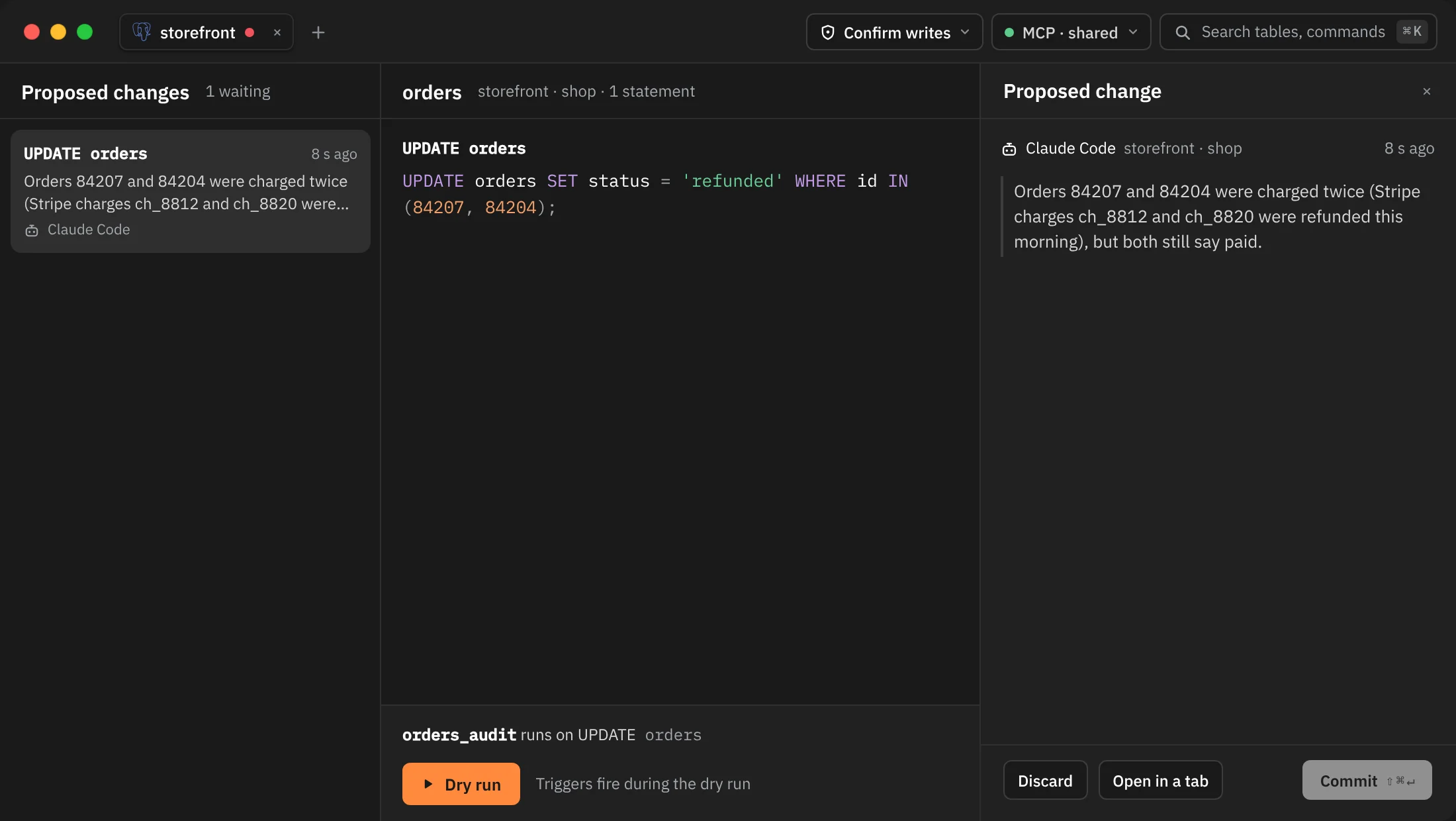
| Part | What it shows |
|---|---|
| Head | The tables it changes, the connection, the database and how many statements |
| Each statement | Its verb and table, such as UPDATE orders, over its exact SQL |
| Triggers | Each trigger the statements would fire, such as "orders_audit runs on UPDATE orders", with "Triggers fire during the dry run" |
| Who and where | The agent's name, the connection and database, and how long ago it arrived |
| Reason | The agent's own words, up to 1,000 characters |
| Warning | "No WHERE: this deletes every row in orders" (or changes) for a DELETE or UPDATE with no WHERE |
Opening the review runs nothing: it only reads which triggers the tables have. Commit stays disabled until you run a dry run.
The list
The list on the left shows every change waiting, oldest first, so you can review them in any order. Click a card, or press ↑ and ↓, to open another one.
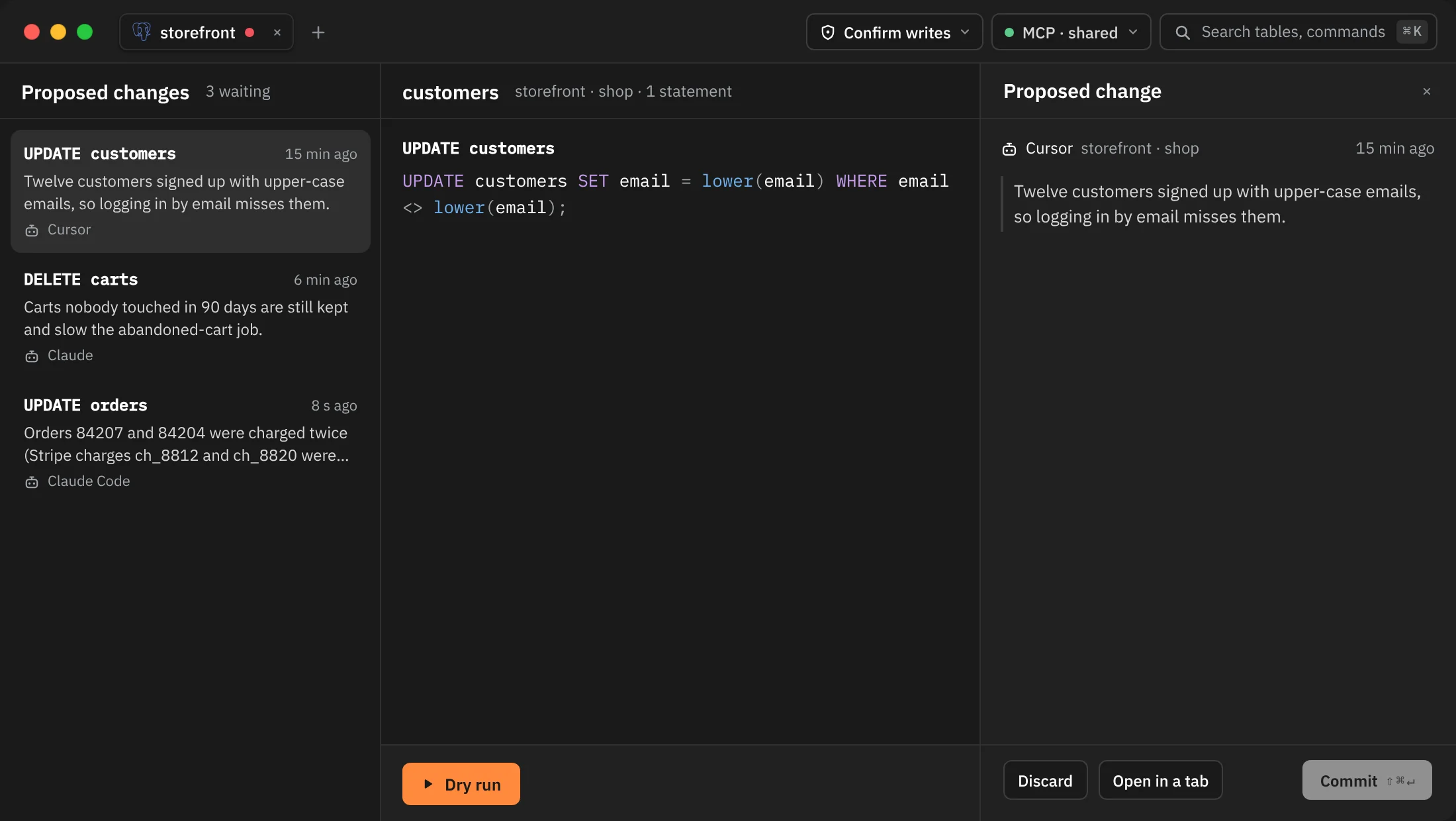
Each card shows the verbs and tables, the agent's reason, which agent sent it and when. A card says "No WHERE" in red when a statement has no WHERE, or "3 rows · dry run" once you've run one. When the changes come from more than one connection or database, the card names it too.
The dry run
Click Dry run. Rowkery runs the statements in a transaction and rolls it back, so nothing is saved.
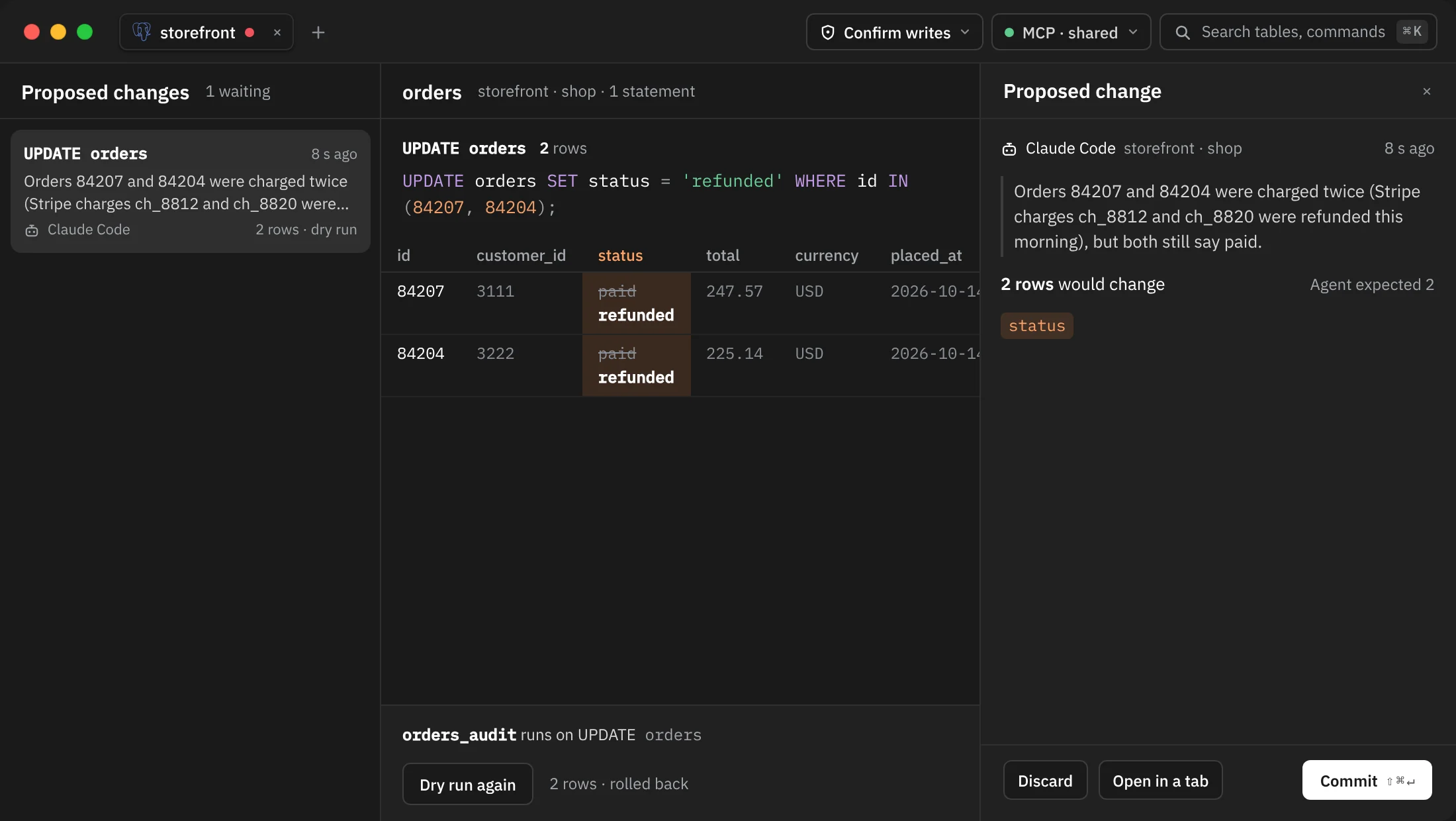
- Under each statement, the rows it changed: for an UPDATE, the old value struck through above the new one in each changed cell; new rows for an INSERT; the rows a DELETE would remove. Up to 200 rows show per statement, with "First 200 of 1,240 rows" beyond that.
- A statement that matches nothing says "No rows match, so this statement changes nothing."
- Beside Dry run, the total and "rolled back", such as "2 rows · rolled back".
- On the right, "2 rows would change" beside "Agent expected 2" when the agent gave a number, and the columns whose values change.
Triggers really run during the dry run, inside the same rolled-back transaction. What they write isn't counted or shown.
If another session holds the rows, the dry run waits 2 seconds, then stops: "Another session is holding these rows, so the dry run stopped after 2 s. Nothing was changed." Click Dry run again to retry. Each change keeps its dry run while you look at another one, so you can come back and commit without running it again.
Commit
Click Commit ⇧⌘↵. A single DELETE or UPDATE with no WHERE labels the button Delete all rows or Update all rows.
Before anything runs, Rowkery checks the change again from the start: the connection must still be shared, its tables still shared, and the SQL must still pass every rule. Then it runs all the statements in one transaction and commits only if each statement changes the same number of rows the dry run showed.
| What happens | What you see |
|---|---|
| It commits | "Committed", with the rows and table, and the proposal leaves the queue |
| The rows changed since the dry run | Nothing is saved. "Nothing was saved: the rows changed since the dry run. Check the new one." A fresh dry run takes its place, ready to commit |
| An error before COMMIT | "Couldn't commit" with the server's message. Nothing was saved, so you can try again |
| The connection dropped during COMMIT | Rowkery can't know whether it was saved, so it never retries. The agent is told it failed, and you should reload the table to check |
During a commit, each lock wait gives up after 3 seconds and each statement after 15.
Discard
Click Discard, type a note for the agent if you want (up to 500 characters), and press ↵ or click Discard again. A toast says "Discarded". Esc backs out of the note without discarding.
Open in a tab discards the change and puts its SQL in a new query tab on that connection, where you can edit it and run it yourself. The agent is told you opened it to change it, so its version won't run.
What the agent learns
check_proposal answers with one of these states:
| State | When |
|---|---|
waiting | Nobody has decided yet |
committed | You committed it, with the rows each statement changed |
rejected | You discarded it, with your note if you wrote one, and a hint not to send it again |
failed | The connection dropped during COMMIT |
expired | Nobody decided within 24 hours |
A failed commit you can retry stays waiting; the agent hears failed only when the outcome is final.
What gets refused
propose_change refuses, before anything is queued:
- a connection whose safe mode is Read-only: it takes no changes, proposed or not;
- anything other than INSERT, UPDATE and DELETE: no schema changes, no function calls on their own, and no CTEs (
WITH …); RETURNING,UPDATE … FROMandDELETE … USING(the agent is told to name the rows withWHERE … IN (SELECT …)instead);- tables that aren't shared, including through a view or subquery;
- any mention of a masked column, whether reading, writing or filtering on it (see Sensitive columns and Presenting);
- on Postgres, functions defined in the database, and the built-in ones agents can't call in a query;
- more than 20 statements, SQL over 20 KB, a missing reason, or a reason over 1,000 characters;
- a sixth waiting proposal on the same connection: five can wait at once.
The same checks run again before the dry run and before the commit, because the queue file could have been changed by something other than Rowkery.
The queue
- Proposals are kept in
proposals.jsonlbeside your config, and decisions inproposal-outcomes.jsonl. They survive a restart: proposals still waiting show in the Agents button's count when you reopen Rowkery, without a toast for each. - A proposal nobody decides on expires 24 hours after it arrived, and leaves the queue.
- The review closes on its own once nothing is left to review. × or Esc closes it earlier; the proposals keep waiting.
- If you stop sharing a connection, its proposals can't run: "This connection is no longer shared with agents, so the change can't run. Discard it, or share the connection again."