Connections
Setting up a connection
A connection is a saved way to reach one Postgres server or SQLite file. Rowkery keeps the details in its config and the password in your Mac's keychain.
Ways to start one
| Do this | What happens |
|---|---|
| New connection ⌘N | Opens the form beside your data |
| Paste ⌘V | Copy a connection string and paste it outside a text field. The form opens filled in |
| Open a SQLite file ⌘O | Pick a .sqlite or .db file, or drop one on the window |
| Found on this Mac | Postgres servers running locally on ports 5432, 5433 or 54329 show up under Connect to start |
What you can paste
# a URL
postgres://maya@db.arcade.internal:5432/arcade?sslmode=require
# libpq keywords
host=db.arcade.internal port=5432 dbname=arcade user=maya
# a psql line
psql -h db.arcade.internal -U maya arcade
# a line from a .env file
DATABASE_URL=postgres://maya@db.arcade.internal/arcade
The form
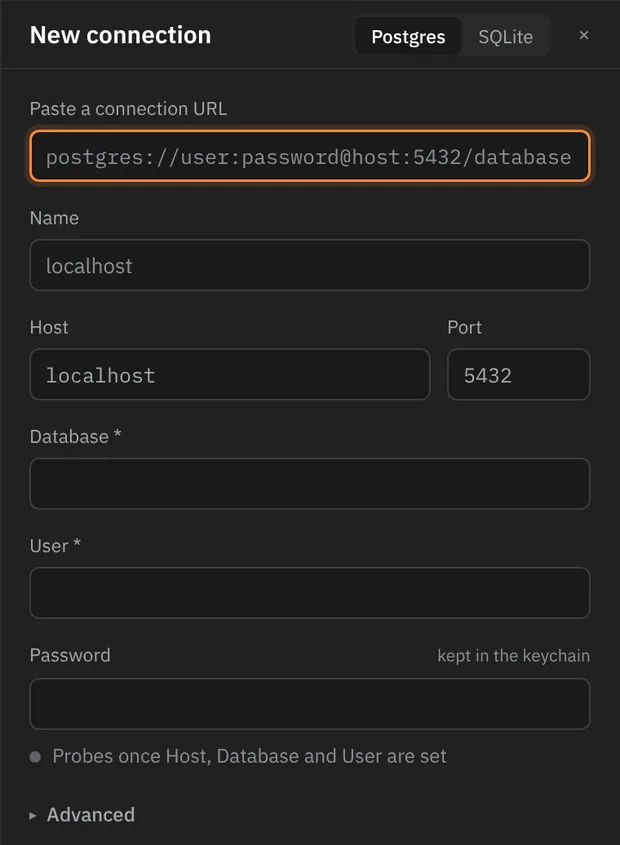
Fill in Host, Database and User. Blank fields use Postgres's usual defaults, shown dimmed.
Once those three are set, Rowkery tries the connection on its own. If the server says no, its reason appears under the field it's about, such as a wrong password under Password.
The password goes to your keychain, one item per connection. Leave it blank when editing a saved connection to keep the stored one.
Save and connect ⌘↵ saves it and opens it in this window.
SSL
Under Advanced. A new connection to a host off your Mac starts on Verify; one to this Mac starts on Prefer. An sslmode in a pasted URL wins.
| Setting | What it does |
|---|---|
| Disable | Never uses SSL |
| Prefer | Uses SSL when the server offers it |
| Require | Always uses SSL, without checking the certificate |
| Verify | Always uses SSL and checks the certificate against your Mac's trusted certificates, or a CA file you choose |
SSH tunnel
Also under Advanced. Give the SSH host, user, and a password or key file. Rowkery remembers each server's host key and tells you if it changes.
Environment
A label that colours the window so you always know where you are: prd stg dev local. Rowkery suggests one from the name and host. It changes nothing about what the connection can do; that's what safe mode is for.
Safe mode
| Mode | What happens to a write |
|---|---|
| Off | Runs as soon as you run it |
| Confirm writes | Stops first and shows the exact SQL. ⇧⌘↵ runs it, Esc drops it |
| Read-only | Refused. The session is also read-only on the server, which catches writes hidden inside functions |
Change it any time from Safe mode in the title bar.
If it can't connect
The window says why in one line (refused, timed out, unknown host, SSL, wrong password, missing role or database, SSH) and shows the server's own message under it. Retry ⌘R tries again and Edit… ⌘E reopens the form.
Edit or delete
Edit connection… in ⌘K reopens the form. Delete is in the same form: it happens at once and the toast offers Undo. The keychain item goes only once the toast has gone.