Working with data
Query tabs
A query tab is an editor for SQL with its results underneath. This page covers running and cancelling queries, what each tab keeps between runs, how results load, and what you see when a query fails.
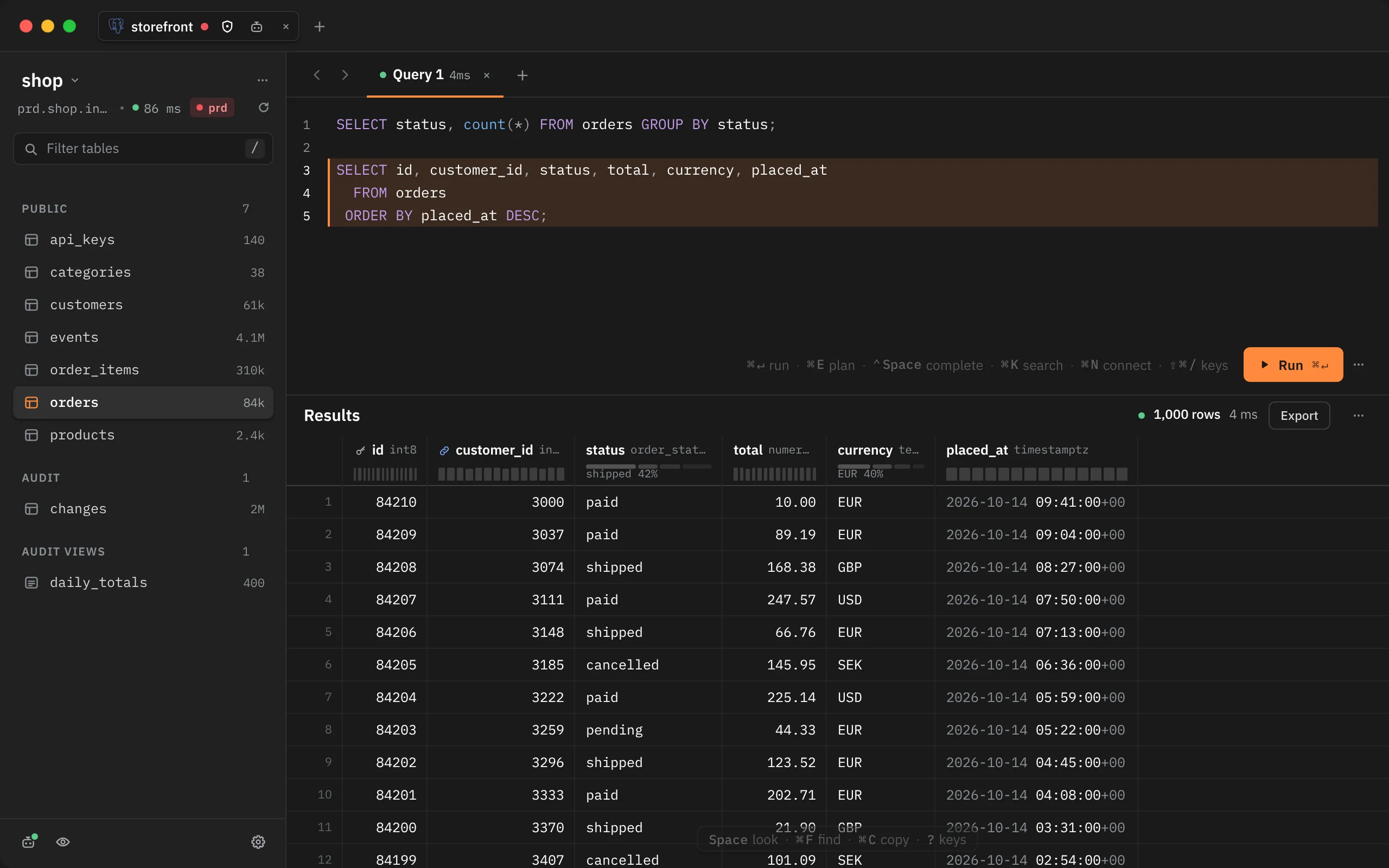
Write and run
Type SQL in the editor and press ⌘↵ (Run statement) to run the statement under the caret. That statement has an orange bar beside it, so you can see what will run before you press anything. If you select some text, the selection is what runs.
⌥⌘↵ (Run all statements) runs every statement in the editor. Both are in the Query menu, and Run all is also in the editor's … menu.
While a query runs, the Run button shows how long it has been running, and the editor is read-only until it finishes. If all 10 of the connection's sessions are busy, the button reads Waiting and the results say Waiting for a free connection until one frees up.
| Key | Command | What it runs |
|---|---|---|
| ⌘↵ | Run statement | The statement under the caret, or the selection |
| ⌥⌘↵ | Run all statements | Every statement in the editor, one after another |
| ⌘E | Explain statement | Nothing: it shows the plan. See Query plans |
| ⌃Space | Complete at the caret | Nothing: it opens completion. See Completion |
| ⌘I | Format SQL | Nothing: it lays out the statement under the caret, or the selected ones |
Editing helpers
- Typing
'or"adds the closing quote. Typing the closing quote steps over it, and ⌫ in an empty pair removes both. A quote typed over a selection wraps it. - Brackets aren't paired.
- ⌘I (Format SQL, also in the Edit menu, the editor's … menu and ⌘K) lays out the statement under the caret with one clause per line, keywords in capitals and function names in lower case. With text selected, it formats every statement the selection touches. The other statements stay as they are, and so do strings, comments and
$$bodies. ⌘Z undoes it in one step. If the SQL doesn't parse, nothing changes and a toast says where it stopped. - Pasting a connection URL into the editor shows Looks like a connection URL with Connect, in case you meant to open it. Esc keeps the text.
Schema changes
When a statement creates, alters or drops a table, view, schema, type, function, procedure, sequence or extension, Rowkery reloads the schema, so the new names show in the schema column and in completion. A change made inside BEGIN shows after you COMMIT.
More than one statement
Run all, or a selection holding several statements, runs them one at a time on the tab's session, so BEGIN … COMMIT works as one transaction. The run stops at the first statement that fails, is cancelled, or is held by safe mode. Each statement keeps its own result: a list beside the grid shows every statement that ran with how it ended (rows, rows changed, or Error), and the results show the last one. Click a statement, or use ↑ / ↓ in the list, to see its result. If one fails, its error is marked in the editor where it happened.
A statement that returns no rows shows how many it changed, such as 1 row changed for an UPDATE. One that changes no rows, such as a SET, shows Query finished with no result set.
Cancel a query
Press Esc or ⌘. (Cancel query), or click Cancel in the results header, to cancel the shown tab's query. While it runs, the header reads Running with the rows received so far and the time.
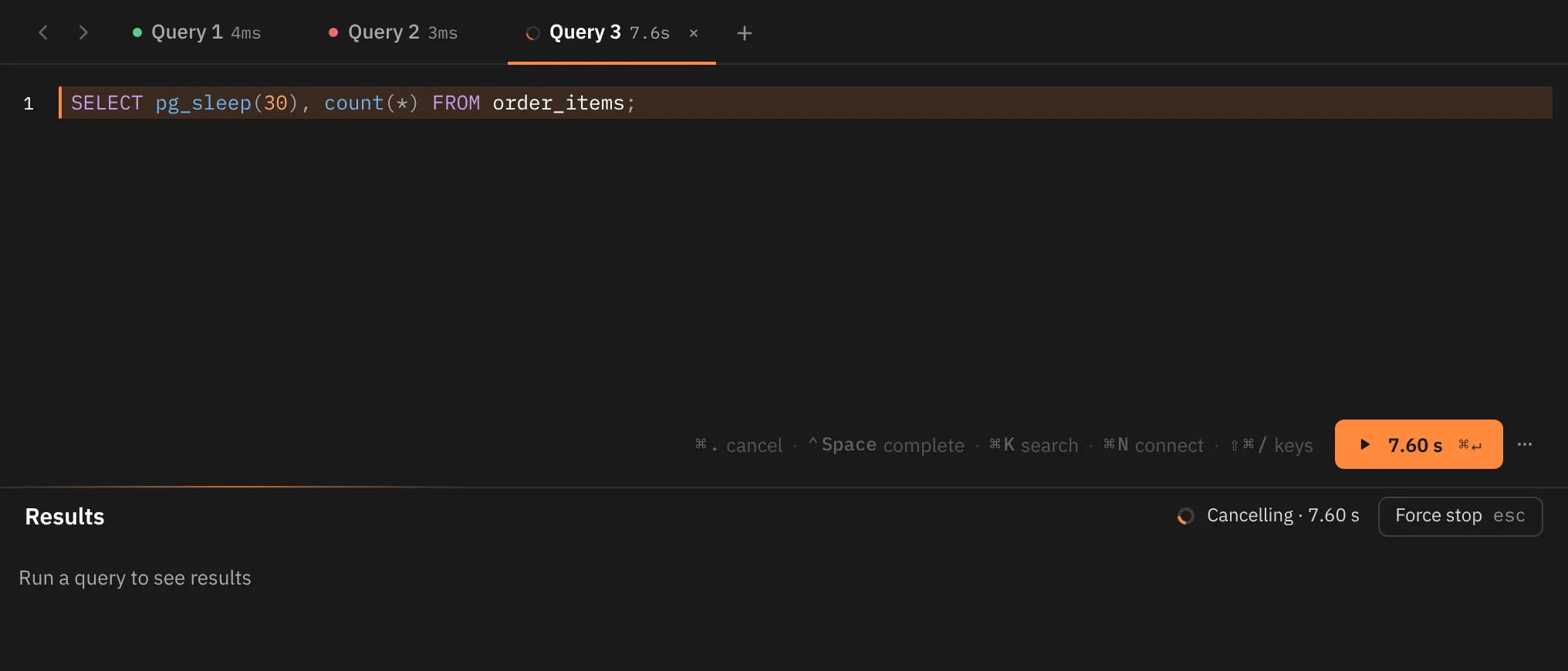
After you cancel, the header reads Cancelling and the button becomes Force stop ("Stop it now, without waiting for the server"). Press it, or Esc again, to stop the run at once. If the server hasn't answered the cancel within 3 seconds, Rowkery stops the run by itself. A cancelled run shows Query cancelled with its time.
⌘. only ever cancels, so use it when something else is open that would take Esc first, such as the completion list.
Stop all queries (in the Query menu, the editor's … menu and ⌘K) stops every running query in every window without waiting for the servers. Use it when a query is stuck and Cancel doesn't help.
Each tab has its own session
On Postgres, each query tab runs on its own server session and keeps it between runs. That means:
- A
SET, such asSET search_pathorSET statement_timeout, stays in effect for the following runs in that tab. BEGINopens a transaction that stays open across runs until youCOMMITorROLLBACKin the same tab.- Temporary tables live as long as the tab's session.
- A cancel stops only that tab's query.
A tab's session closes after 2 minutes unused and reopens when you next run something. It's never closed while it holds a transaction you opened or a result that's still paging. Each saved connection holds at most 10 sessions, shared by its windows and tabs.
If the connection drops while you have a transaction open, the server rolls that transaction back. The next run in that tab says so ("nothing since BEGIN was saved"), runs nothing, and asks you to run your statements again.
Rowkery doesn't show a sign that a tab has a transaction open. While one is open, saving row edits in that tab is refused until you commit or roll back. See Editing rows.
Tabs
A new query tab is called Query 1, Query 2 and so on. A running tab shows a spinner and its time. A finished one shows a green dot, or a red one if it failed, with its time until you run it again.
| Do this | How |
|---|---|
| New query tab | File › New Query Tab, the + at the end of the tab row, or the tab menu |
| Close a tab | ⌘W, the tab's ×, or a middle-click on the tab |
| Close the others | Close other tabs in the tab menu |
| Reopen a closed tab | ⇧⌘T, File › Reopen Closed Tab, or the tab menu |
| Next or previous tab | Go › Next Query Tab and Go › Previous Query Tab |
| Put the caret in the editor | Go › Focus Editor |
| Reorder tabs | Drag a tab along the row |
Right-click a query tab for its menu: New query tab, Close tab, Close other tabs (with Undo) and Reopen closed tab. Tabs can't be renamed.
The Rowkery keymap has no key for a new query tab. With the TablePlus keymap it's ⌘T, and with DataGrip ⇧⌘L. See Shortcuts and keymaps.
Closing and reopening
⌘W closes whichever you used last: the tab, or the window if your last click was on the window's pill or in the schema column. File › Close Tab reads Close Window when that's what it would close.
Closing a tab with SQL in it shows a toast such as Closed Query 2 with unsaved SQL with Undo. Closing the last tab leaves an empty Query 1. Rowkery remembers the last 10 tabs you closed. A tab you reopen while its toast is up comes back with its rows; later, it comes back with its SQL and waits for you to run it. Undo and Esc has more on this.
What's saved
Your tabs, the SQL in each one and which tab is shown are saved to Rowkery's config file and come back when you open the window again. Results aren't saved, so run the query again to see them. SQL is saved when you leave the editor or stop typing for a moment. See Where Rowkery keeps things.
Results
Rows appear as they arrive, so you can read the first ones while the rest load.
How many rows
A query tab loads every row its query returns, so a LIMIT in the SQL is what decides how many: LIMIT 2000 shows 2,000 rows. A query with no LIMIT on a big table loads all of it, which can take a while. A tab holds at most 1,000,000 rows and says Stopped at 1,000,000 rows if a result goes past that; to get more, export it.
The results header reads Results, with no Data / Structure switch: a query can join several tables, so it has no one table to show the structure of. To see a table's structure, open the table from the schema column.
The row limit
A tab holds at most 1,000,000 rows. When a result gets to that many, loading stops and a toast says Stopped at 1,000,000 rows. Add a WHERE or LIMIT to narrow it down. To save a large result to a file, see Exporting and copying.
Reading the grid
- Click a column header to sort the loaded rows.
- Under each header, a small profile sums up the column from the first 5,000 rows: a histogram for numbers and dates, the top value and its share, or how many values are unique, plus how many are null.
NULLshows as the word NULL, so you can tell it from an empty string.- JSON and JSONB cells are tinted.
- Large integers (
int8beyond 9,007,199,254,740,991) andnumericvalues keep every digit.
When a query reads exactly one table, the cell menu offers Open as table tab. See Table tabs and filters.
To copy or save results, see Exporting and copying. To see one row in full, see Quick Look.
Clear results
Clear results (Query › Clear Results, or the … menus) empties the shown tab's results and error, and leaves the SQL as it is.
Find in results
Press ⌘F (Find in results) on a query tab with rows to search the loaded rows.
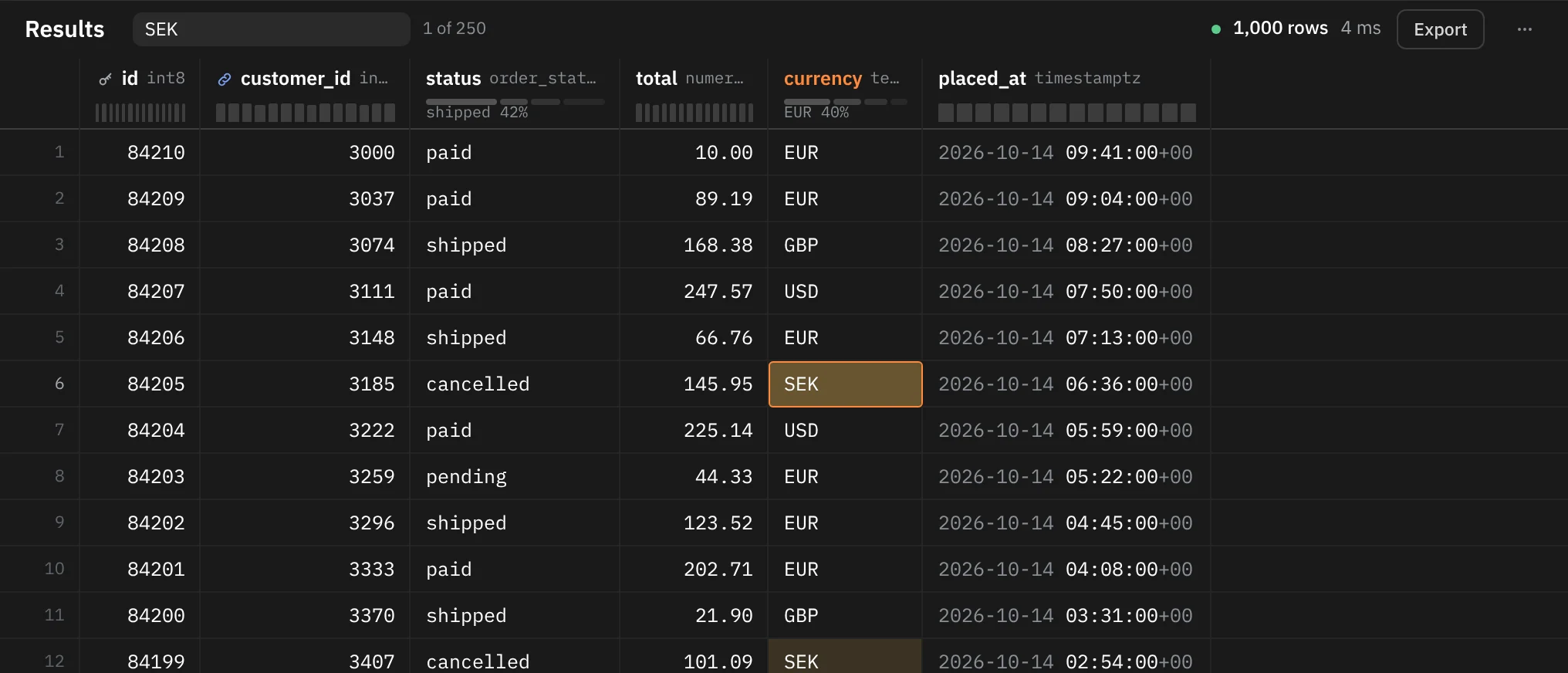
The field shows 1 of 250 or No matches. Press ↵ for the next match and ⇧↵ for the previous one. Esc closes the field. Find searches the rows already loaded. On a table tab, ⌘F is Filter rows instead; see Table tabs and filters.
When a query fails
The results show the server's message, with help to fix it where Rowkery can offer some.
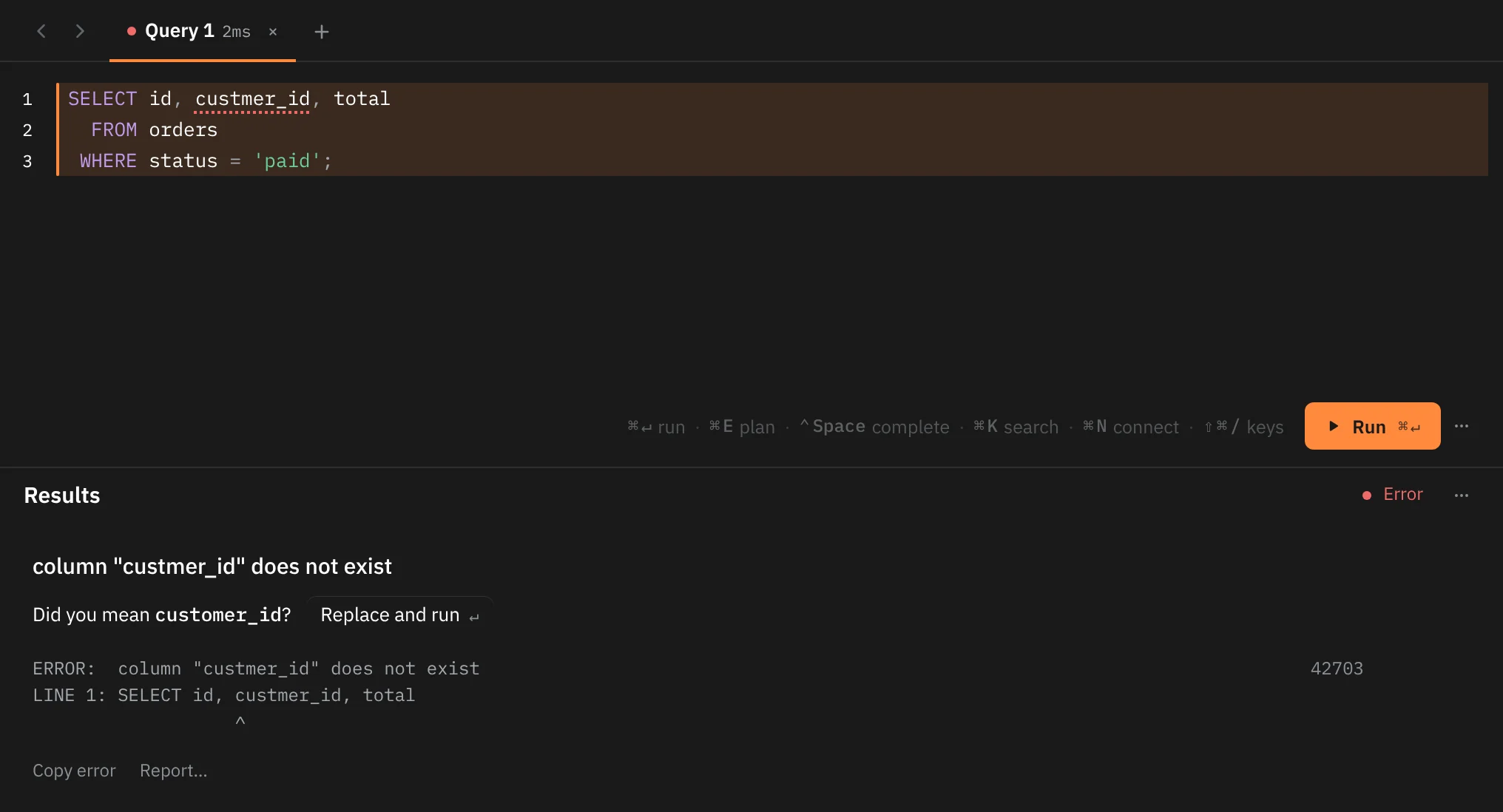
- Where it went wrong. When the server gives a position, the caret moves there, the word gets a dotted underline and its line number turns red. Any edit clears the mark.
- Did you mean. For a column or table that doesn't exist, Rowkery looks for a close name (up to two letters off) among the statement's tables or the schema, and offers it as Did you mean customer_id? Click Replace and run, or press ↵ with the caret in the underlined word, to fix it and run again.
- The full text. The server's message as psql would print it, with the line and a caret under the spot, and the SQLSTATE code such as
42703. - Copy error copies that text, and Report… lets you send the error with a note of your own.
Recent queries
Every statement you run is kept in the connection's history: the last 50, newest first. Find them in ⌘K under Recent queries, or type q: to search only them. ↵ opens the SQL in the current tab if it's empty, or in a new tab, without running it. ⌥↵ inserts it at the caret. See Search with ⌘K.
Timings
Timings in ⌘K (also in the … menus) opens a sheet with how long recent steps took against their budgets: the app's launch, and for the last query, the time from Run to the first rows, to rows on screen, and on the database. Copy copies the numbers, which helps when you report something slow. Esc closes it.