Connections
Environments and safe mode
Every connection has two settings that keep you oriented and protect your data. The environment is a coloured label that tells you where you are. Safe mode decides what happens when you run something that would change data: it runs, it waits for you to confirm, or it's refused.
The two are separate on purpose. Marking a connection prd changes nothing about what it can do, and safe mode is never set for you from the environment. A new connection has safe mode Off, and no environment unless you pick one or keep the one Rowkery suggests.
Environments
There are four labels, each with its own colour:
| Label | Full name | Colour |
|---|---|---|
| prd | Production | Red |
| stg | Staging | Orange |
| dev | Development | Blue |
| local | Local | Green |
A connection can also have no environment, which is the default.
Where the label shows
- The window's pill in the title bar has a dot in the environment's colour, so you can tell your windows apart at a glance. Hovering the pill names the environment in full.
- The schema column, on the line under the database name, beside the host, shows the word tag.
- When the schema column is hidden (⌘B), the tag moves to the left of the tab row, beside the connection and database names.
- Switch connection (⇧⌘O) and Connect to start show the tag beside each saved connection. In Switch connection you can type
prd,stg,devorlocalto list only that environment's connections. - The Agents page shows the tag on each connection's card and in the activity log.
- A held write names the environment first, such as "prd · storefront / shop", so you see where it would land before you run it.
Suggested labels
When you fill in a new Postgres connection, Rowkery suggests an environment from its name, database and host, and the form says suggested beside it. It looks for these words, as whole words separated by dots, dashes, underscores or spaces:
| Suggests | Words |
|---|---|
| prd | prd, prod, production, live |
| stg | stg, stage, staging, uat, preprod |
| dev | dev, develop, development, test, qa |
| local | local, localhost, or a host of 127.0.0.1, ::1, 0.0.0.0 or host.docker.internal |
Production words win over the others, so orders-prod on a local SSH tunnel still reads as prd. The suggestion is picked in the form, and it's saved with the connection unless you change it. When nothing matches, the form stays on None. Click any label, or None, to choose yourself. Editing a saved connection keeps the environment it has.
A Postgres server you pick under Found on this Mac is saved as local. A SQLite file gets no suggestion.
Change or clear the environment
- In the connection form (Edit connection… in ⌘K, or the pencil in Switch connection), choose None, prd, stg, dev or local under Environment.
- In ⌘K, run Set environment: Production (prd), Set environment: Staging (stg), Set environment: Development (dev) or Set environment: Local (local) for the shown window's connection, or Clear environment to remove it.
A toast confirms it, such as Marked Production or Environment cleared.
Safe mode
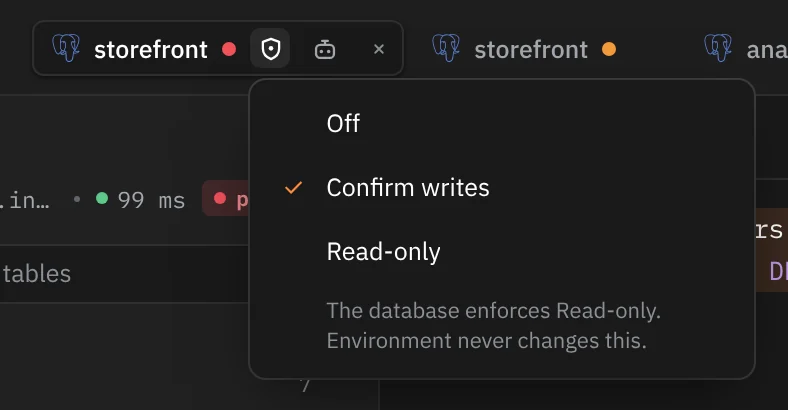
Safe mode has three levels:
| Mode | What happens when you run a write |
|---|---|
| Off | It runs straight away |
| Confirm writes | It stops before anything reaches the database and shows you the exact SQL. ⇧⌘↵ runs it, Esc drops it |
| Read-only | It's refused and never runs. The connection is also read-only on the database itself |
Reads always run, whatever the mode.
Defaults
Every new connection starts on Off, including the sample database. Rowkery never turns safe mode on by itself, and never picks a mode from the environment, so set it on each connection where you want it.
Change safe mode
- The window's pill: while a window is connected, its pill in the title bar carries a shield after the environment dot: bare for Off, with a dot for Confirm writes, with a bar for Read-only. Hover it for the mode's name, and click it for a menu of the three modes; the current one is ticked. It's a menu on purpose: a stray click can't change the mode.
- Change safe mode… in ⌘K or Connection › Change Safe Mode… opens the same menu.
- Safe mode: Off, Safe mode: Confirm writes and Safe mode: Read-only in ⌘K switch directly.
- The connection form has a Safe mode row under Environment.
- Change safe mode… on a Read-only refusal opens the menu too.
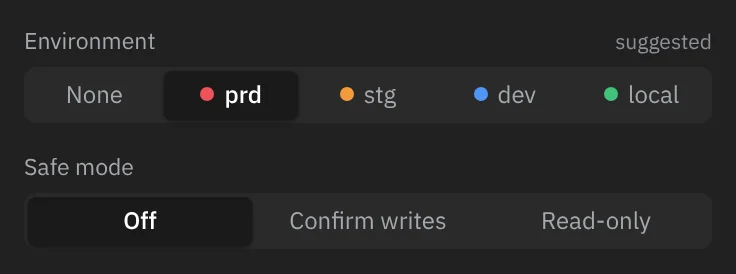
A toast confirms the change, such as Safe mode: Read-only. It takes effect on the next thing you run in every window on that connection, without reconnecting. Moving to Read-only gives each tab a fresh read-only session when it next runs.
What counts as a write
Rowkery checks each statement before it sends it. The check reads the SQL text once, with the same quoting rules as the editor: strings, quoted names, comments and Postgres $$ bodies are skipped, so a DELETE inside a string or a comment doesn't count. A run with several statements is checked statement by statement.
| Kind | Statements | Under Confirm writes | Under Read-only |
|---|---|---|---|
| Read | SELECT, WITH without a data change, EXPLAIN without ANALYZE, SHOW, VALUES, TABLE, FETCH, MOVE, DECLARE, CLOSE, LISTEN, UNLISTEN, COPY … TO, a PRAGMA that only reads | Runs | Runs |
| Session | SET, RESET, BEGIN, START, COMMIT, END, ROLLBACK, ABORT, SAVEPOINT, RELEASE, DISCARD, DEALLOCATE, PREPARE | Runs | Runs, unless it would let later statements write (below) |
| Data change | INSERT, UPDATE, DELETE, MERGE, SELECT … INTO, a WITH holding INSERT, UPDATE, DELETE or MERGE, COPY … FROM, PRAGMA name = value, EXPLAIN ANALYZE of any of these | Held | Refused |
| Schema change | CREATE, ALTER, DROP, TRUNCATE, GRANT, REVOKE, COMMENT, REINDEX, VACUUM, CLUSTER, ANALYZE, SECURITY LABEL, IMPORT FOREIGN SCHEMA, REASSIGN OWNED, ATTACH, DETACH, REFRESH MATERIALIZED VIEW | Held | Refused |
| Anything else | CALL, DO, EXECUTE, LOCK, NOTIFY, and any statement Rowkery doesn't recognise | Held | Refused |
Functions that stop other sessions
pg_cancel_backend(…) and pg_terminate_backend(…) stop another session's work even though they're called from a SELECT. Rowkery counts any statement that calls either one as a write, and pg_terminate_backend as a destructive one.
SQL Rowkery can't be sure of
Some text can read differently on different servers, or never ends: a string, comment or $$ body left open, a comment nested inside another, or \' inside a plain string. A statement with any of these counts as a write, shown as Unclear SQL, rather than risk running a write as a read. Close the string or comment, or write a quote inside a string as '', and it's checked normally.
Statements that would unlock writes
On a Read-only connection, Rowkery also refuses session statements that would turn the database's read-only setting off for later statements: SET or RESET of transaction_read_only or default_transaction_read_only, anything with READ WRITE (such as BEGIN READ WRITE), RESET ALL, DISCARD ALL, and SQLite's PRAGMA query_only. The refusal says "It would let later statements write."
Destructive writes
DROP, TRUNCATE, and a DELETE or UPDATE with no WHERE of its own are destructive. Under Confirm writes they're held in red with a plain warning and a button that says what will happen:
| Statement | Warning | Button |
|---|---|---|
DELETE with no WHERE | No WHERE: this deletes every row in orders (about 84,000). | Delete all rows |
UPDATE with no WHERE | No WHERE: this changes every row in orders (about 84,000). | Update all rows |
TRUNCATE | This empties orders (about 84,000 rows). | Truncate |
DROP | This drops orders and everything in it. It can't be undone. | Drop |
The row count comes from the schema Rowkery loaded, when it knows one.

What the check doesn't see
The check reads the text you wrote, so it guards against slips, not against everything. SELECT delete_user(1) reads as a read, even if the function deletes rows. That's what Read-only's second layer is for: the database itself refuses the write.
Confirm writes
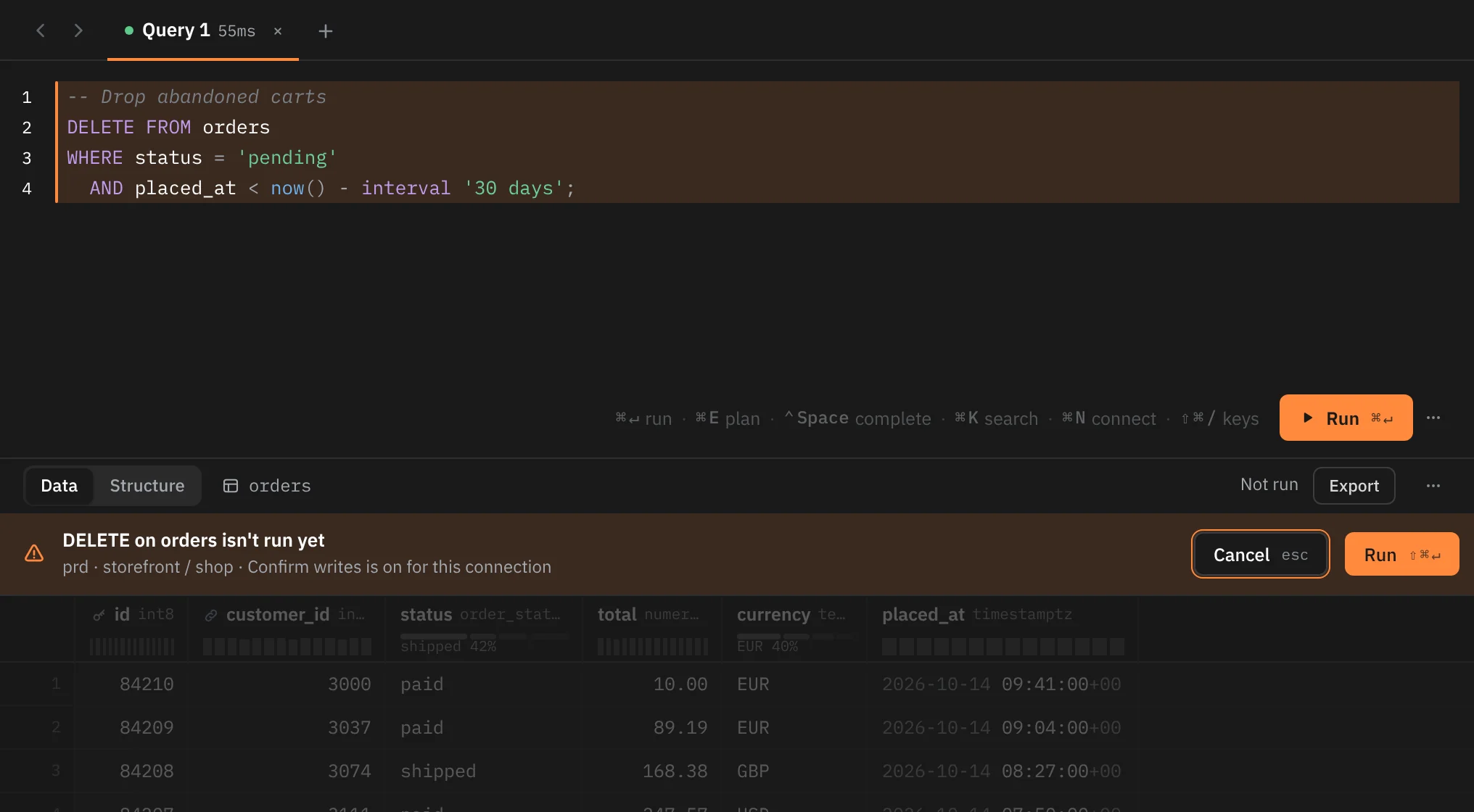
Under Confirm writes, a write stops before it's sent. A strip at the top of the results shows:
- What's waiting: DELETE on orders isn't run yet, or 3 writes aren't run yet followed by each statement's verb and table.
- For a destructive statement, the warning in red.
- Where it would run: the environment, the connection and the database, then "Confirm writes is on for this connection".
The results header says Not run, and the last results stay on screen, faded, until something new runs.
| Key | What it does |
|---|---|
| ⇧⌘↵, or Run | Runs exactly the SQL that was held, once |
| Esc, or Cancel | Drops it. Nothing was sent |
The commit key needs ⇧, so pressing ⌘↵ again never runs a held write. Running with ⌘↵ once more checks the statement again and holds it again.
Run all statements (⌥⌘↵) runs statements one at a time and stops at the first one safe mode holds. The statements after it don't run until you run them again.
Row edits in a table tab
When you commit staged edits (⌘S) under Confirm writes, the strip shows Confirm writes with the connection and environment, a summary such as "3 statements on public.orders: INSERT 1 · UPDATE 1 · DELETE 1", and the exact transaction Rowkery will run, from BEGIN; to COMMIT;.
- Commit ⇧⌘↵ sends exactly that SQL.
- Keep editing Esc closes the strip and keeps your edits staged.
If the edits change after the strip appeared, the strip goes, and committing the old text fails with "The changes moved since you confirmed them. Review them again." Editing rows covers staging and committing.
Read-only
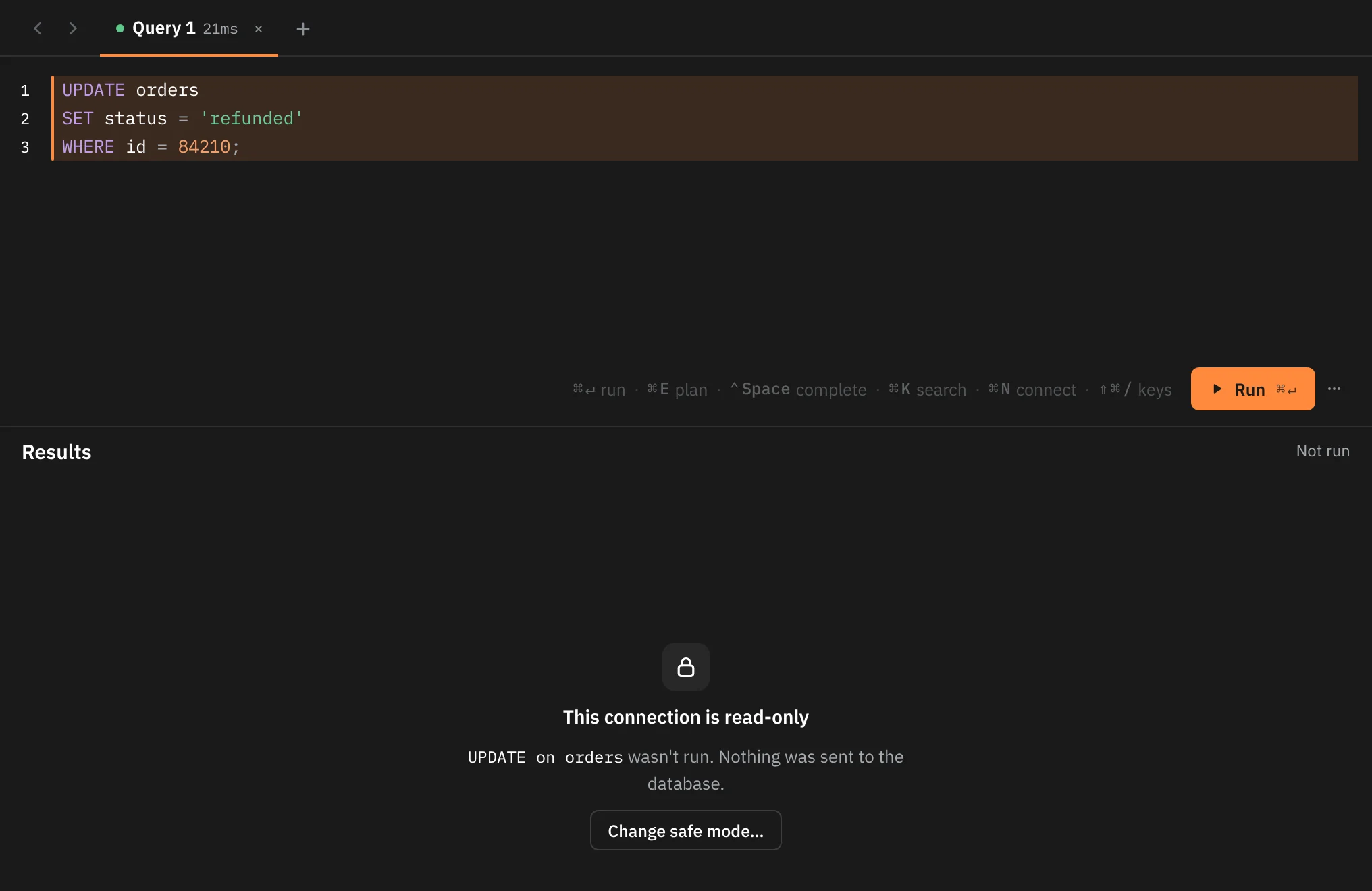
On a Read-only connection, a write is refused before it's sent. The results say This connection is read-only and name what wasn't run, such as "UPDATE on orders wasn't run. Nothing was sent to the database." ⇧⌘↵ does nothing here. Change safe mode… opens the Safe mode menu, and Esc dismisses the refusal.
Read-only on the database too
Read-only isn't only a text check. Rowkery also opens the connection read-only on the database:
- Postgres: every session Rowkery opens for the connection runs
SET default_transaction_read_only = onfirst, so each transaction is read-only on the server. - SQLite: Rowkery turns on SQLite's
query_onlysetting for the file.
So a write the text check can't see, such as a function called from a SELECT that inserts or deletes rows, still fails, with the database's own error. And a statement that would turn that setting back off is refused before it's sent (see Statements that would unlock writes).
What Read-only refuses
- Writes and schema changes you run in a query tab.
- Row edits: pressing ↵ on a cell opens no editor, and the edits bar says "Read-only connection · Change safe mode…" for a few seconds. Insert row and Duplicate row aren't available.
- Agents' proposed changes: an agent's
propose_changeis refused with "Refused: storefront is Read-only in Rowkery, so it takes no changes, proposed or not." A proposal that was waiting before you switched to Read-only can't be dry-run or committed either. - Sessions: Cancel query and End session in the Sessions tab show "This connection is read-only, so its sessions can't be stopped from Rowkery."
- Explain with timings of a write.
What goes through safe mode
| Feature | Off | Confirm writes | Read-only |
|---|---|---|---|
| A write in a query tab | Runs | Held in the results until ⇧⌘↵ | Refused |
| Committing row edits (⌘S) | Commits | Held with the exact transaction until ⇧⌘↵ | Refused; cells can't be edited |
| Explain with timings, or Run with timings on a plan (Postgres) | Runs the statement once with ANALYZE; a write is rolled back | A write is held first, then run and rolled back | A write is refused |
| Sessions tab: Cancel query | Runs | Shows the SQL in Review SQL first | Refused |
| Sessions tab: End session | Shows the SQL in Review SQL first | Shows the SQL in Review SQL first | Refused |
| An agent's proposed change | Waits for your review: Dry run, then Commit | Waits for your review: Dry run, then Commit | Refused |
| Hover prefetch | Reads only | Never prefetches a statement safe mode would hold | Never prefetches a statement safe mode would hold |
Ending a session always asks first, even with safe mode Off, because it rolls back that session's open transaction and nothing can bring it back. Sessions has the details.
Agents never write through Rowkery, whatever the connection's safe mode: every query an agent runs uses a read-only session, and a change it suggests waits for you on the Proposed changes page.