Working with data
Completion
As you type in a query tab, Rowkery suggests keywords, tables, columns, joins, functions and enum values from the connection's schema. This page covers when the list opens, what it offers where, and how it orders suggestions.
Open and pick
The list opens on its own when you type a letter, a digit, _, $, ., " or '. Press ⌃Space (Complete at the caret) to open it with nothing typed, for example right after FROM .
| Key | What it does |
|---|---|
| ↑ ↓ | Move through the list |
| Page Up, Page Down | Move 8 rows |
| ↵ or ⇥ | Insert the highlighted suggestion |
| Esc | Close the list |
Clicking a row inserts it too. Moving the caret elsewhere closes the list. It shows up to 50 suggestions, 9 at a time, and each row says what it is on the right, such as a column's type or a table's row count.
Nothing completes inside comments or numbers.
Keywords
At the start of a statement you get the statement keywords: SELECT, WITH, INSERT INTO, UPDATE, DELETE FROM, EXPLAIN, EXPLAIN ANALYZE, CREATE, ALTER, DROP, TRUNCATE, BEGIN, COMMIT and ROLLBACK. Postgres adds SHOW, VACUUM, ANALYZE, COPY and SET; SQLite adds PRAGMA, VACUUM and ATTACH.
Keywords come in the case you're typing, so sel gives select and SEL gives SELECT. After a table name, a keyword needs two letters before it's offered, so names stay at the top. After UPDATE t you get SET, and after INSERT INTO t you get VALUES, SELECT and DEFAULT VALUES.
Tables
After FROM, JOIN, UPDATE, INTO, USING, TABLE or TRUNCATE, the list offers tables, views, materialized views and the CTEs your statement defines. Each row shows the table's row count, or that it's a view or materialized view, and its schema.
- A table outside your search path, or one whose name exists in two schemas, is inserted with its schema, such as
audit.changes. - When the database has more than one schema, schema names are offered too, once you've typed a letter.
- Partitions of a partitioned table aren't offered, though a statement that names one still completes its columns.
Joins
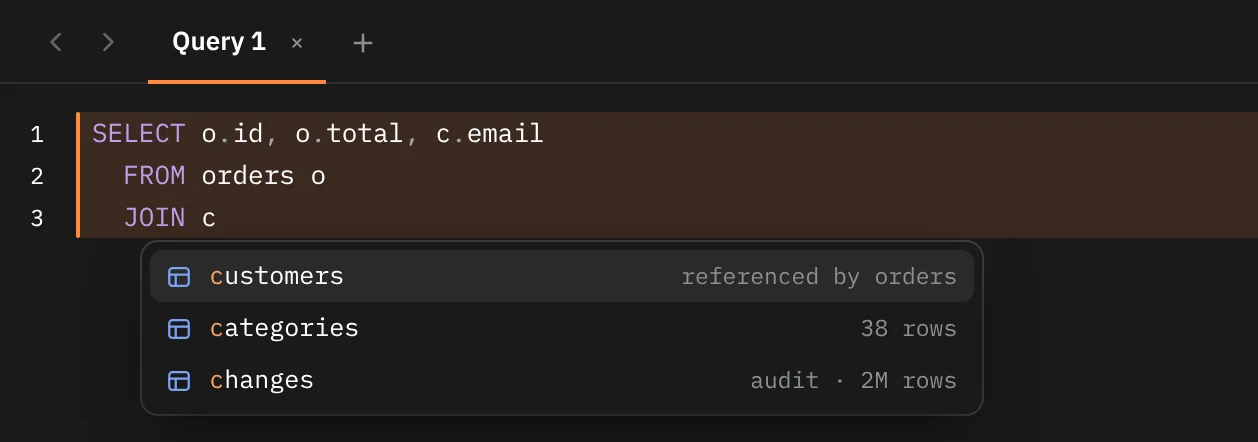
After JOIN, tables linked to the ones already in your query by a foreign key come first, marked references or referenced by with the other table's name.
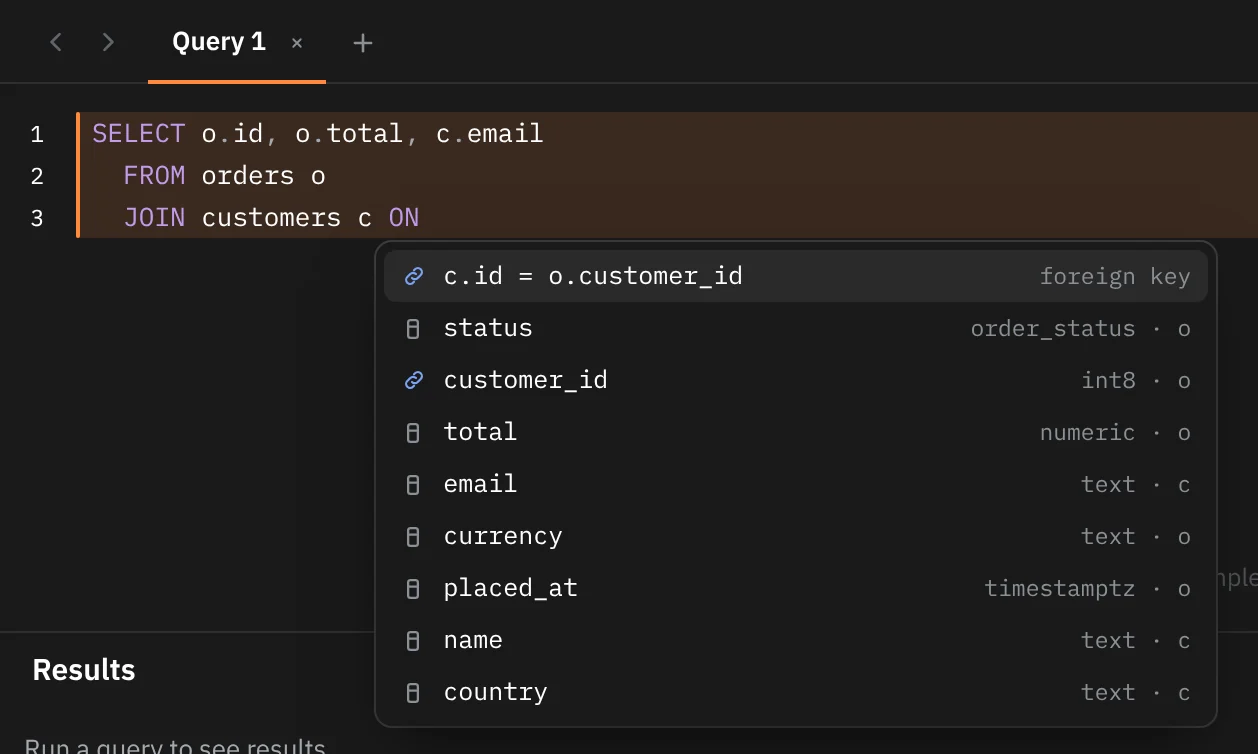
After ON, press ⌃Space or start typing: the first suggestion is the whole join condition built from the foreign key, such as c.id = o.customer_id, marked foreign key.
Columns
In a select list, a WHERE, ON, GROUP BY, ORDER BY or any other expression, the list offers the columns of the tables in your statement, nearest first, with their types. A column name that two of those tables share is inserted with its alias, such as o.id. Key icons mark primary key and foreign key columns.
- Type an alias and a dot, such as
o., to see only that table's columns. - Type a schema and a dot, such as
audit., to see its tables, then a dot after the table for its columns. - Quoted names, such as
"Order Items", complete too. - Columns of a CTE or a subquery in
FROMare known by name. - Aliases themselves are offered.
- In an
INSERT INTO t (…)column list, you get the columns not listed yet, with the ones that need a value first.
Expand a star
Press ⇥ right after a * to replace it with the full column list. It works after SELECT, DISTINCT, a comma, or an alias such as o.*. With more than one table in the query, the columns are inserted with their aliases.
Functions
Functions are offered once you start typing a name: a built-in list for each engine, plus your own functions on Postgres (functions that belong to an extension aren't listed). A function that takes arguments is inserted as name() with the caret between the brackets.
Enum values
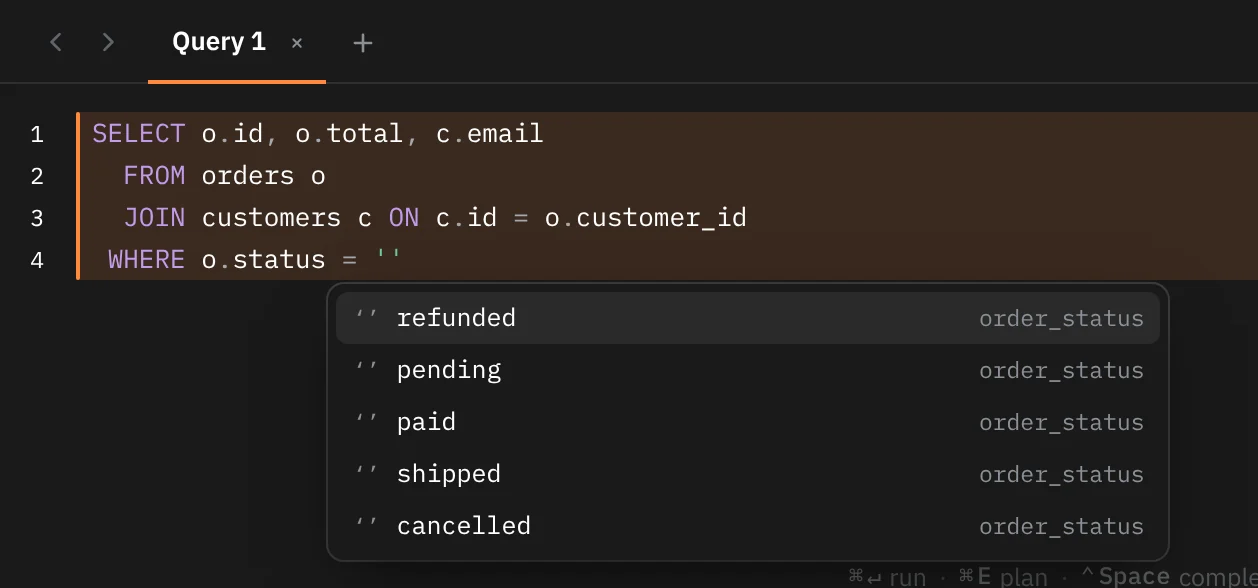
On Postgres, typing a quote after an enum column, as in status = ' or status IN ('paid', ', offers that enum's values in the order they're defined. The closing quote is added for you.
How suggestions are ordered
Names that start with what you typed come first, then names with a word inside that starts with it (items finds order_items), then names whose words start with your letters in order (oi also finds order_items). Keywords only match from their start. Among equal matches, Rowkery prefers:
- Names in your recent queries on this connection. Older use counts less, halving every 7 days.
- Tables linked by a foreign key to the ones in your statement.
- Tables in your search path.
- Bigger tables.
Keywords you use often rise too, and an expression keyword you run a lot appears after one letter instead of two. These keyword habits carry across connections, halve every 30 days, and are saved in Rowkery's config file.
SQLite
Completion works the same on SQLite, with a few differences: SQLite has no enums and no user-defined functions to offer, and its search path is the main database.
Insert a name from the schema column
To put a table or column name into the editor without typing it, pick it in the schema column and press ⌥↵ (Insert name), or right-click it and choose Insert name.