Working with data
Query plans
Press ⌘E in a query tab to see how the database plans to run a statement, with the slowest step marked and, when Rowkery spots a likely fix, a hint with the SQL for it.
Show a plan
Put the caret in a statement, or select it, and press ⌘E (Explain statement). The plan replaces the results in a card titled Plan, and the header reads Estimate.
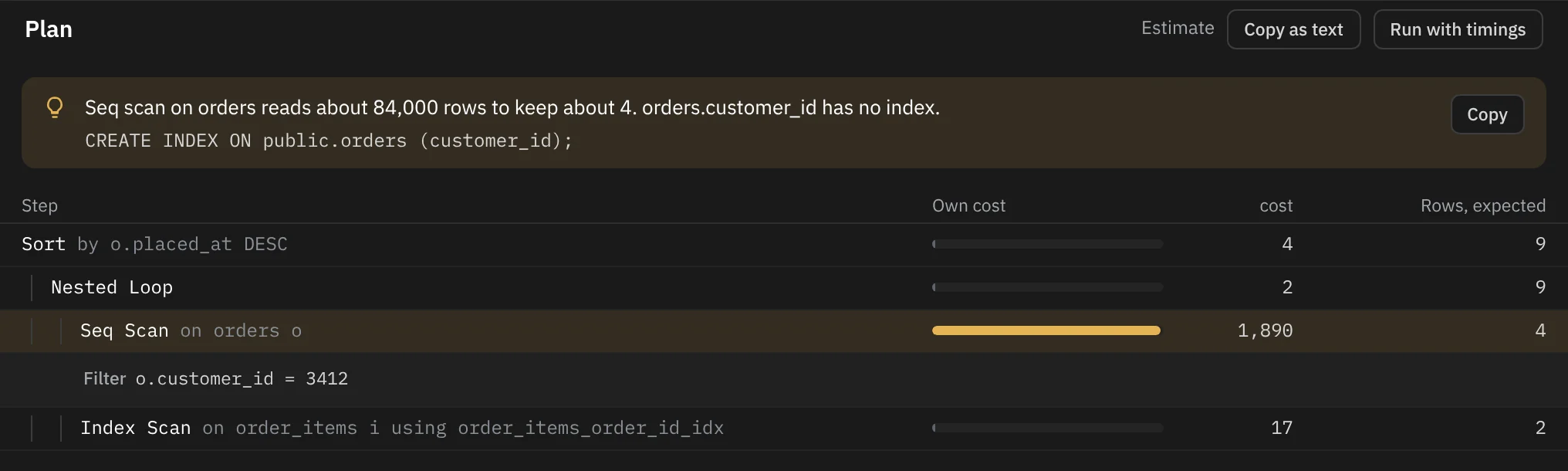
An estimate runs nothing, not even a write: the database only says how it would go about it. Safe mode treats it as a read, so ⌘E on a DELETE shows its plan without asking.
⌘E works on one statement at a time. With several selected, Rowkery says Explain works on one statement at a time. If the statement already starts with EXPLAIN, it asks you to remove it and press ⌘E again.
On a table tab, ⌘E is Edit SQL instead. Explain isn't in the menu bar; find it in ⌘K or in the key strip beside Run (⌘E plan).
Run with timings
On Postgres, Run with timings in the plan header (or Explain with timings in ⌘K) runs the statement once and shows how long each step really took and how many rows it really returned. The header then reads Ran in with the time and the row count, and the button becomes Run again.
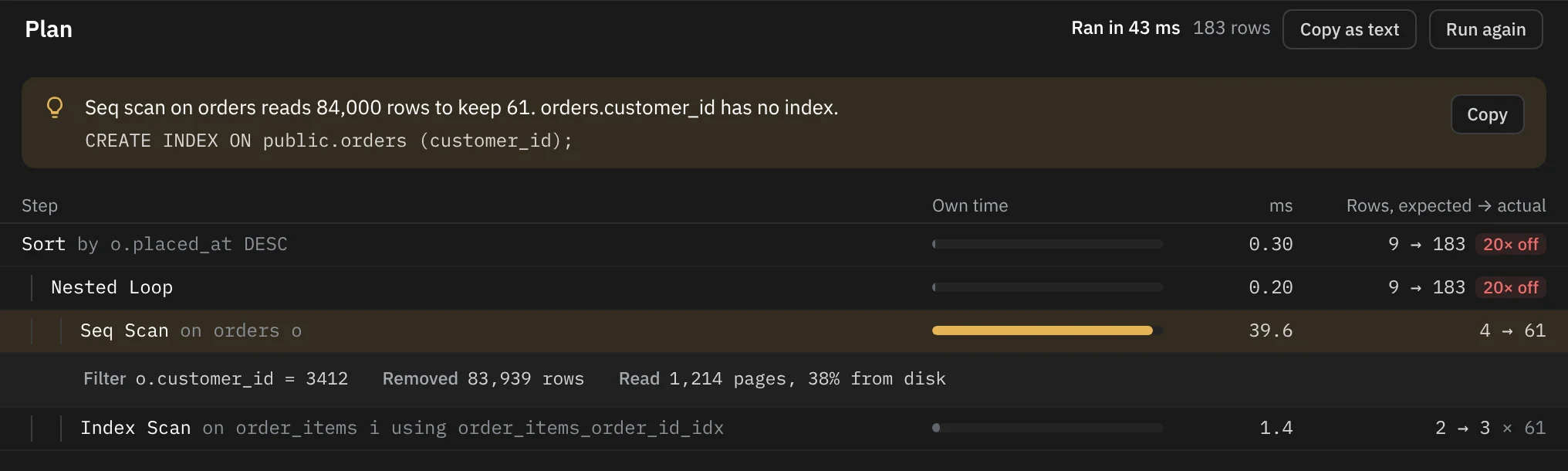
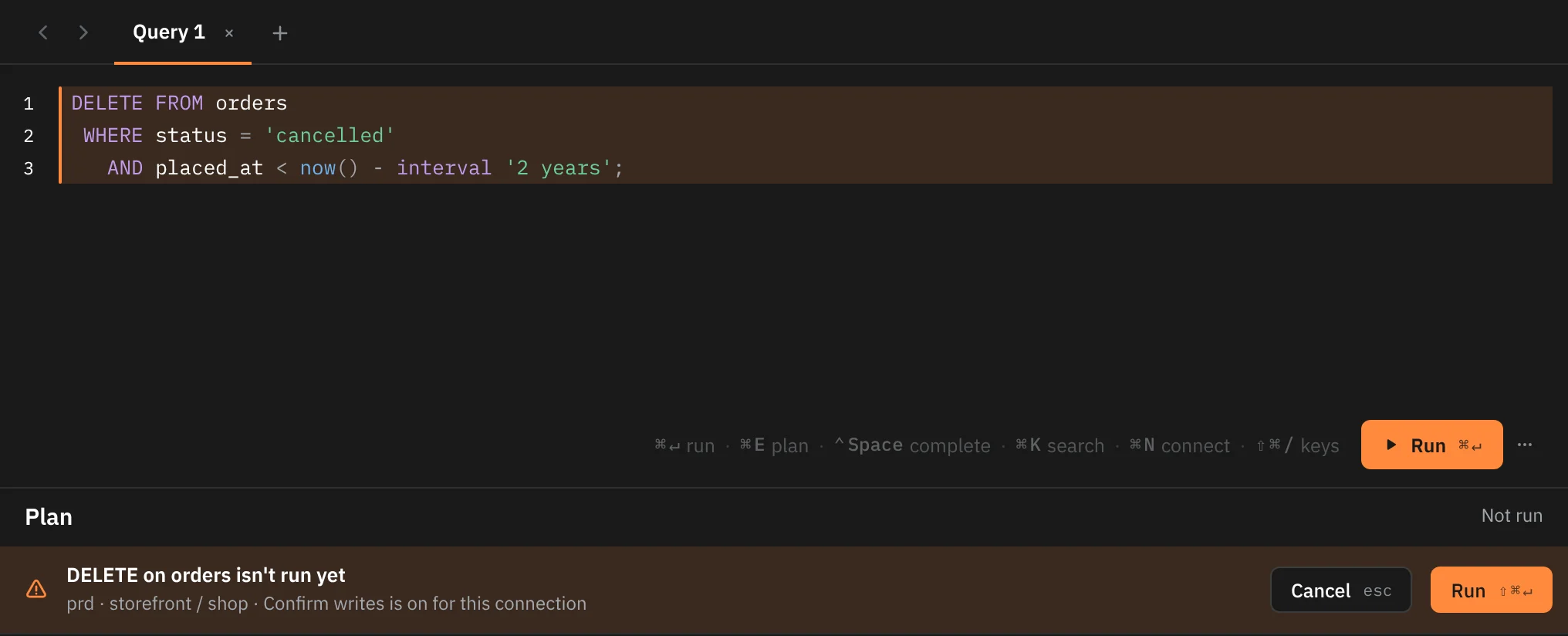
A timed plan of a read runs the read. A timed plan of a write goes through safe mode like any other write:
- With Confirm writes, it stops first and shows the statement with Not run in the header. ⇧⌘↵ runs it and Esc drops it.
- With Read-only, it's refused.
- When it does run, it runs inside a transaction that is always rolled back, or inside a savepoint if you have your own transaction open in the tab. You see the timings, and your data stays as it was.
Esc or ⌘. cancels a timed plan that's taking too long, the same as a query. The next plan you ask for replaces the one shown.
Reading a plan
Each row is one step of the plan, indented under the step that uses its output. The columns are:
| Column | Estimate | With timings |
|---|---|---|
| Step | The kind of step and what it works on, such as Seq Scan on orders | The same |
| Own | Own cost: the step's share of the planner's cost, leaving out the steps under it | Own time: the time spent in the step itself, in ms |
| Rows | Rows, expected: how many rows the planner thinks the step returns | Rows, expected → actual, with the number of loops when the step ran more than once, such as 2 → 3 × 61 |
The step that costs the most is tinted and opens by itself. Click any step to open its details.
Step details
| Detail | What it tells you |
|---|---|
| Index Cond, Recheck Cond | The condition used to look up rows in an index, and the one checked again on each row found |
| Hash Cond, Merge Cond, Join Filter | How a join matches rows |
| Filter | A condition checked on each row after reading it |
| Removed | Rows the filter threw away, across all loops |
| Rechecked away | Rows dropped on the recheck |
| Sort | How the step sorted and how much memory or disk it used |
| Hash | How many batches a hash used and its peak memory |
| Spilled | How much the step wrote to disk because it didn't fit in memory |
| Read | Pages read, and how many came from disk rather than memory (with timings) |
| Workers | Parallel workers launched |
Bad guesses
In a timed plan, a step whose row guess was off by 10 times or more, and by at least 100 rows across its loops, gets a tag such as 20× off. A bad guess often leads the planner to pick the wrong join or scan, so these are worth a look.
Hints
Rowkery looks at the steps that carry at least a tenth of the plan's cost or time, heaviest first, and shows at most one hint above the plan. It checks for these, in this order:
| What it found | The hint | Suggested SQL |
|---|---|---|
| A scan through a table of 10,000+ rows that keeps under 1% of them, filtering on a column no index starts with | "Seq scan on orders reads … rows to keep …. orders.customer_id has no index." | CREATE INDEX ON … |
| A row guess off by 1,000 rows or more (with timings) | "Postgres expected … rows from orders and got …. Its statistics may be out of date." | ANALYZE … |
| A sort that spilled to disk | "The sort wrote … to disk. A larger work_mem keeps it in memory." | SET work_mem = … |
| A hash or hash aggregate that spilled, or a hash join split into batches | "The hash join split into … batches on disk. A larger work_mem keeps it in one." | SET work_mem = … |
| A full scan repeated more than 100 times, once per row of a join (with timings) | "… is scanned in full … times, once per row from the other side of the join." | CREATE INDEX ON … when a filter column has no index |
A filter that wraps an indexed column in a function, such as lower(email) | "lower(email) can't use … Index lower(email), or compare email directly." | CREATE INDEX ON … (lower(email)) |
Rowkery never runs a hint's SQL. Click Copy to copy it, then decide whether to run it yourself. Building an index on a large table takes time and locks, and a bigger work_mem costs memory on the server.
SQLite
On SQLite, ⌘E shows the steps of EXPLAIN QUERY PLAN: which tables SQLite scans or searches and which indexes it uses. SQLite gives no costs or times, so there are no own times, no expected rows and no Run with timings.
It hints at two things: a full scan of a table with 10,000 rows or more ("If you filter or join on one of its columns, an index on it lets SQLite go straight to the rows."), and a sort SQLite does itself for ORDER BY ("An index on the ORDER BY columns returns them already in order."). These hints have no SQL to copy.
Copy a plan
Copy as text in the plan header copies the plan as indented text, one line per step, to paste into a ticket or a chat.